Spider icon
Spider icon

Spider

 1 like

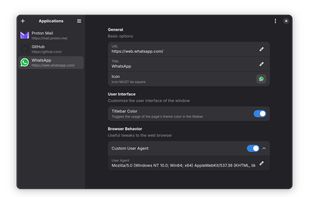
Install and integrate web apps into GNOME desktop! Spider uses WebKit to display sites in isolated windows with icons, titles, and integrated themes, functioning as independent apps. It’s a lightweight, practical way to use web services like native applications on the Linux desktop.
Spider screenshot 1

Cost / License

Application type

Since

  • Since 2025

Updated

  • Updated May 2026

Platforms

  • Linux
  • Flathub
  • Flatpak
1like
0articles
Save

Features

Properties

Features

Highlights All activities

Spider News & Activities

Recent activities

No activities found.

Spider information

AlternativeTo Category

OS & Utilities

GitHub repository

  •  151 Stars
  •  10 Forks
  •  46 Open Issues
  •   Updated  
View on GitHub
Spider was added to AlternativeTo by braky on and this page was last updated .

No comments or reviews, maybe you want to be first?

Official Links

Install from the command line

  • flatpak install flathub io.github.zaedus.spider

Be careful what you paste into a terminal. Check what a command installs before running it.

What is Spider?

Spider is a GNOME utility that turns any website into an independent, native-like desktop application. Each web app runs in its own isolated WebKit instance, improving security and performance. It lets you customize icons, titles, and window colors to match the site or GNOME theme, creating a cohesive native look. Spider also includes features like custom user agents, window size memory, and easy app management (edit, update, or delete). Distributed via Flatpak on Flathub, it’s simple to install and maintain. Perfect for using services like Gmail, Trello, or YouTube in dedicated windows, it keeps your workspace clean, organized, and seamlessly integrated into the Linux desktop.