
SpeedDial 3
Like
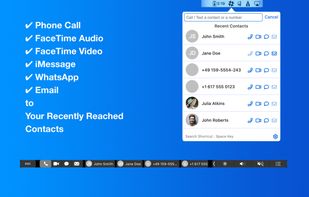
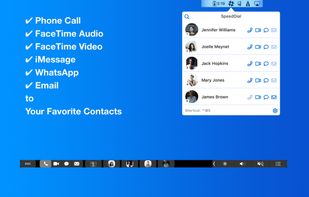
SpeedDial lets you make phone or FaceTime calls to your favorite contacts and send iMessage / SMS, WhatsApp and email messages to them from your Macbook or iMac without any need to reach your iPhone.
Cost / License
- Pay once
- Proprietary
Platforms
- Mac


+2


SpeedDial 3
Like
0likes
0comments
0alternatives
0articles
Features
- Speed dial
SpeedDial 3 News & Activities
Highlights All activities
Recent activities
No activities found.
SpeedDial 3 information
No comments or reviews, maybe you want to be first?
What is SpeedDial 3?
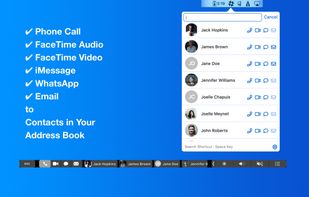
SpeedDial lets you make phone or FaceTime calls to your favorite contacts and send iMessage / SMS, WhatsApp and email messages to them from your Macbook or iMac without any need to reach your iPhone.
- Phone calls or sending messages make you interact with your iPhone. Often, this can lead to spending (if not waste) time on checking the social media or other apps after completing the call, or messaging. Moving these communication tasks to your Mac using SpeedDial will let you focus on your main task and it will help preventing the unwanted procrastination and time wasting.
- With SpeedDial 3, you can find your contacts much more rapidly. Speed dial contacts, recent contacts and fast search enable this.
Features:
- Call / FaceTime Audio and Video your favorite contacts with one click
- Send iMessage / SMS and WhatsApp messages to your favorite contacts
- Send emails to your favorite contacts
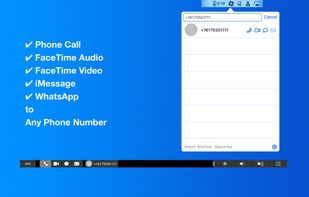
- Call / FaceTime or send iMessage / WhatsApp to any number or a contact in your address book
- Email to any contacts in your address book
- With recent contacts, you can reach your contacts that you communicate often lately.
- Your contacts are on Touch Bar.
- Menubar app: It is available all the time regardless of open app.
More Features:
- Auto-launch: When enabled, the app will be available everytime you log in to your computer
- Keyboard Hotkeys: You can open the app using Cmd + Ctrl + s (You can assign a custom hotkey too.)
- Strong keyboard shortcuts: When the app is active, pressing keys from 1 to 9 will call the corresponding SpeedDial contact. Similarly, Option + keys (1 to 9) will send iMessage / SMS and Command + keys (1 to 9 ) will FaceTime corresponding SpeedDial contact.
- Dark mode: It is available in both normal and dark mode themes *You need WhatsApp Desktop installed on your Mac. You can install it from Mac App Store.