Music through headphones sounds like it's happening inside your skull. Left is hard left, right is hard right, and everything sits between your ears rather than in front of you the way it does with real speakers. After an hour, it gets tiring. SPECTER fixes this.
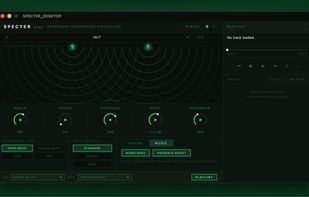
SPECTER DESKTOP is a real-time audio enhancement app that makes headphones sound like a pair of speakers placed in a room. Sound moves outside your head, instruments spread naturally across a space in front of you, and listening becomes as relaxed and immersive as sitting in front of a proper stereo setup.
WHAT IT DOES
The app intercepts audio from any Windows application and processes it before it reaches your headphones. The result is a more natural, speaker-like presentation — depth, width, and a convincing sense of physical space — without changing what the music actually sounds like tonally.
SOUND CONTROLS
• Virtual Speaker Distance — Set how close or far the imaginary speakers feel. Pull them in for an intimate near-field setup or push them back for a more open, room-filling sound.
• Focus — Controls how solid the center of the mix feels. Keeps vocals and lead instruments grounded as you open up the stereo field.
• Presence Boost — Adds a subtle sharpness to the upper midrange, bringing out detail, transient snap, and spatial cues that can soften with heavy processing.
• Headphone Type — Applies a corrective curve matched to your headphone style (open-back, closed-back, or in-ear monitors) so the enhancement starts from a flat, accurate baseline.
TWO LISTENING MODES
• Music — Optimised for long listening sessions. Natural, musical, and easy on the ears over extended periods.
• Gaming — Directional sounds like footsteps and environmental cues stay sharp and precisely located.
WORKS WITH ANY AUDIO SOURCE
• Route audio from any Windows application directly through SPECTER DESKTOP.
• Load your own files (WAV, FLAC, MP3, AIFF) into the built-in playlist and process them without an external player.
• Save and recall named presets for different headphone models or listening scenarios.






 EU
EU
 makrofon added SPECTER DESKTOP as alternative to Hajo's Headphone Enhancer, Boom 2, Razer Surround and Spatial Sound Card
 makrofon


No comments or reviews, maybe you want to be first?