SoundPaste icon
SoundPaste icon

SoundPaste

Introducing SoundPaste, the simple yet revolutionary app that can copy-paste sound!
SoundPaste screenshot 1

Cost / License

  • Pay once
  • Proprietary

Platforms

  • Mac
SoundPaste screenshot 1
SoundPaste screenshot 2
0likes
0comments
0alternatives
0articles

Features

  1.  Ad-free
  2.  Audio Recording
  3.  sound recorder

SoundPaste News & Activities

Highlights All activities

Recent activities

No activities found.

SoundPaste information

  • Developed by

    Maxim Kuzmenko
  • Licensing

    Proprietary and Commercial product.
  • Pricing

    One time purchase (perpetual license) that costs $8.
  • Alternatives

    0 alternatives listed
  • Supported Languages

    • English

AlternativeTo Category

Audio & Music
SoundPaste was added to AlternativeTo by Paul on and this page was last updated .
No comments or reviews, maybe you want to be first?

What is SoundPaste?

Introducing SoundPaste, the simple yet revolutionary app that can copy-paste sound!

Say goodbye to the tedious process of dealing with saving and opening sound files; with SoundPaste, simply record, copy, and paste sound directly to your preferred AV editing software. Ideal for avid samplers and creators, SoundPaste streamlines your workflow, letting you focus more on creating and less on logistics. Experience the magic of hassle-free sound manipulation with SoundPaste!

Imagine this:

  1. Play audio from the source that you want to record
  2. Press hotkey, for example "Command-Option-R” to begin recording
  3. Press "Command-Option-R” once again to stop recording
  4. Scroll over to Final Cut/Logic/your AV editing program of choice and hit "Command-V"
  5. That’s it! The recorded audio magically appears.

———— FEATURES ————

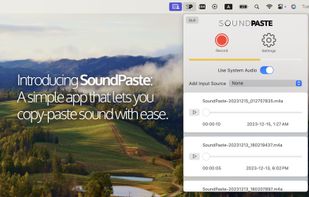
  • Record, copy and paste sound
  • Record system sound, any audio/microphone input, or both
  • Record sound with the app minimized; monitor recording status through color changes in the menu bar icon
  • Play, navigate and drag-and-drop your recordings from the track view
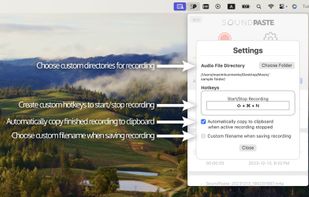
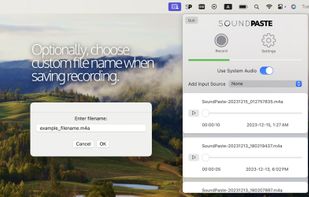
  • Custom filename when saving recording
  • Create custom hotkeys to start/stop recording
  • Choose custom directories for recording

Official Links