SoftOrbits TranscribeIt icon

SoftOrbits TranscribeIt

TranscribeIt (SoftOrbits) is offline transcription software for Windows that turns audio and video files into accurate text on your own PC. This local AI transcription tool runs a speech to text model right on your machine, so nothing is uploaded to the cloud.
SoftOrbits TranscribeIt screenshot 1

Cost / License

  • Paid
  • Proprietary

Application type

Platforms

  • Windows

Features

  1.  Speech to text

 Tags

SoftOrbits TranscribeIt News & Activities

Highlights All activities

Recent activities

SoftOrbits TranscribeIt information

AlternativeTo Categories

Audio & MusicVideo & Movies
SoftOrbits TranscribeIt was added to AlternativeTo by SoftOrbits on and this page was last updated .
No comments or reviews, maybe you want to be first?

What is SoftOrbits TranscribeIt?

TranscribeIt (SoftOrbits) is offline transcription software for Windows that turns audio and video files into accurate text on your own PC. This local AI transcription tool runs a speech to text model right on your machine, so nothing is uploaded to the cloud. No account, no per-minute fees, no daily limit - just fast, private audio to text and video to text conversion.

🔰 How to use

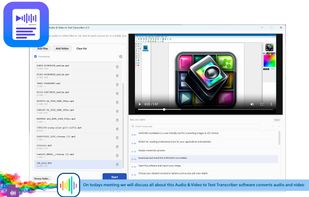
  1. Drag and drop your files, or click Add Files or Add Folder to queue a whole batch.
  2. On first run it downloads a local AI model - after that the transcription software works fully offline.
  3. Toggle time codes on or off and pick where the .txt and .srt files are saved.
  4. Click Start and watch the progress bar, or process an entire folder in one run.
  5. Open any result in the built-in player, click a segment to jump to that moment, edit the text and save.

👍 Why choose it

  1. 100% offline and private - your recordings never leave your PC, ideal for confidential interviews and legal, HR or medical audio.
  2. One-time purchase - no subscription and no cloud per-minute pricing; the licensed version has no daily limit.
  3. Batch transcription - add unlimited audio and video files and convert them all in a single run.
  4. Generate subtitles fast - built-in SRT export with HH:MM:SS timing for videos and reels.
  5. Wide format support - MP4, MOV, MKV, WEBM, AVI, WMV, TS, MP3, M4A, AAC, FLAC, OGG, OPUS, WAV and more.
  6. No GPU required - the speech to text model runs on an average CPU; optional GPU acceleration is used if present.
  7. 25 languages built in, plus a downloadable model covering 100+ languages for global recordings.
  8. Built-in player and editor with click-to-seek time codes to correct any transcript quickly.
  9. Convert audio to text and export clean .txt notes you can search, summarize or feed to AI.
  10. No signup and no email required - free download, then a low one-time license.

Great for

  • Journalists and researchers who transcribe interviews and meetings into searchable notes.
  • Students turning lectures and webinars into study text.
  • Creators who need to generate subtitles and SRT export for videos.
  • Legal, HR and medical teams handling sensitive recordings that must stay on-device.
  • Building a searchable text archive from media files in batch mode.

Does it work offline and is it private? Yes - offline transcription runs a local AI model and nothing is uploaded to third-party servers. Do I need a powerful PC or GPU? No - the speech to text engine is optimized for an average CPU; GPU is optional. Can I export subtitles? Yes - one click gives you an .srt file with time codes, plus plain .txt. Can I edit the transcript? Yes - each file opens in a player and editor synced to time codes. How many languages are supported? 25 out of the box, with a 100+ language model available to download.

A privacy-first, offline alternative to Otter.ai, Descript and Happy Scribe.
