




Snappy for Mac
Like
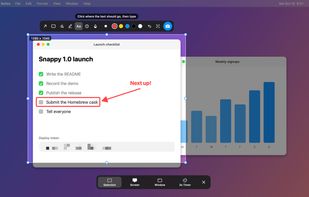
Free, open-source screenshot app for macOS that lets you adjust, mark up and blur a selection before you capture it, Ubuntu-style.

Cost / License
- Free
- Open Source (MIT)
Application type
Platforms
- Mac

Features
Highlights All activities
Snappy for Mac News & Activities
Recent activities
- Beqa-Abuladze added Snappy for Mac
- Paul updated Snappy for Mac
 Beqa-Abuladze added Snappy for Mac as alternative to CleanShot X, Shottr, Snipping Tool and Lightshot

Licensing
Open Source (MIT) and Free product.Written in
Alternatives
4 alternatives listedBadge
Get an embeddable badge for Snappy for MacSupported Languages

AlternativeTo Categories
Office & Productivity, Photos & GraphicsGitHub repository
- 3 Stars
- 0 Forks
- 0 Open Issues
- Updated


No comments or reviews, maybe you want to be first?