
Snapline icon
Snapline icon

Snapline

Screenshot & screen-recording studio for the macOS menu bar. Scrolling capture, OCR-searchable history, no cloud, no subscription.
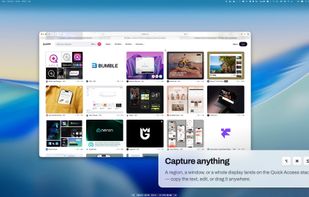
Capture a region, a window or a whole display; each shot lands on the Quick Access stack.

Cost / License

  • Paid
  • Proprietary

Application type

Platforms

  • Mac  Requires macOS 14 (Sonoma) or later. Apple Silicon and Intel.
  • Homebrew  brew install --cask snapline
0likes
0articles

Features

Properties

  1.  Lightweight
  2.  Privacy focused

Features

  1.  Works Offline
  2.  Non Destructive Editing
  3.  Built-in Color Picker
  4.  Dark Mode
  5.  No registration required
  6.  Annotate Screenshot
  7.  OCR
  8.  No Tracking
  9.  Ad-free
  10.  Full-page Screenshot
  11.  Image Conversion
  12.  Screen Recording
  13.  Webcam recording
  14.  Sits in the menu bar
  15.  Screenshot OCR
  16.  Image Optimizer
  17.  Convert Videos to Animated GIFs
  18.  Keystroke Visualization

Snapline News & Activities

Highlights All activities

Recent activities

Snapline information

Snapline was added to AlternativeTo by Ziad Ziadeh on and this page was last updated .
No comments or reviews, maybe you want to be first?

Official Links

What is Snapline?

Snapline is a native macOS screenshot and screen-recording app that resides in the menu bar. It is capable of capturing regions, windows, and displays. Additionally, it can stitch long pages into one tall image while you scroll. However, it never scrolls for you, so it does not need Accessibility permission.

This app records to MP4 with an optional webcam bubble and click/keystroke overlays. It also has the ability to convert recordings to GIF. You can save your captures as PNG, JPEG, HEIC or WebP. Moreover, Snapline can convert, compress, or redact a shot from the card that appears after it.

One key feature is its ability to read the text in every capture on the device. This means your whole history is searchable by what the screenshots say. Importantly, the app does not require an account, cloud, or telemetry. Screen Recording is the only permission it needs.

Snapline is available for a one-time purchase with a perpetual license and a year of updates. It is free to try in full for 14 days.