


SmoothScroll
SmoothScroll will give your mouse wheel (Chrome, Word, OneNote, text editors, PDF, etc.) buttery smooth scrolling.
Cost / License
- Subscription
- Proprietary
Platforms
- Mac
- Windows

Features
- High stability
- Simplicity
- Infinite smooth scroll
- No registration required
- Works Offline
- Ad-free
- Smooth Scrolling
Tags
- mouse-utility
- fast-scrolling
- horizontal-scrolling
- scrolling
SmoothScroll News & Activities
Recent News
Recent activities
- JJ1992 reviewed SmoothScroll
I was in need of an app to smoothen out my bluetooth mouse scrolling on my MacBook. SmoothScroll suits my needs perfectly. I wasn't previously aware of the availability of a software like this - but I'm chuffed to have found it. The impact it has had on my computer usage has been really positive. Thanks for developing such a truly useful app.
- KimToo reviewed SmoothScroll
As a software dev, I find SmoothScroll very effective and easy to use. It fixed my jumpy/flickering mouse wheel scrolling issues and makes long code navigation in IDEs like Visual Studio smoother and more precise. I like the minimalistic UI and useful pre-optimized preference options.
- KimToo liked SmoothScroll
- alsamin69420 reviewed SmoothScroll
I like smooth scroll because of how easy it is to use and how user friendly it is. The setup is really easy and it works really good. It gives the user a very premium scrolling experience and makes it feel much better. Would definitely reccomend this app!
- alsamin69420 liked SmoothScroll
- jcub-lurk reviewed SmoothScroll
This app is the only way to properly configure your mouse scroll wheel movement, accuracy, and precision in windows. The app is very well designed, with a simple to use user interface. Pros: • Well-designed interface • Many customization options • Great customer support • Great price • Works for all apps and can be configured to exclude certain applications Cons: • I did not like the default settings, and it took me a few tries before I found a setting that I prefer. (however my mouse is a...
- jcub-lurk liked SmoothScroll
- Smith064 reviewed SmoothScroll
Have tried other apps for enable smooth scrolling but this worked in every app that I use in my Mac (specially in Zen, a Firefox based browser where no other app worked well on). It's simple, the options are enough for a good experience and liked the way this improves the system feeling.
- Smith064 liked SmoothScroll
- enverulusoy reviewed SmoothScroll
It's a handy app when using a mouse (excluding the Magic Mouse) on macOS. It makes scrolling smoother. You might wonder why you need an app to make scrolling smoother, but you'll see the difference when you try it. It's not a big deal, but it's a nice feature to have.
What is SmoothScroll?
SmoothScroll will give your mouse wheel (Chrome, Word, OneNote, text editors, PDF, etc.) buttery smooth scrolling.
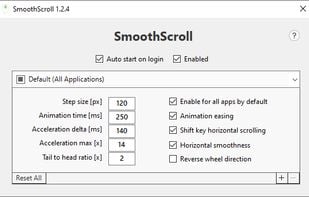
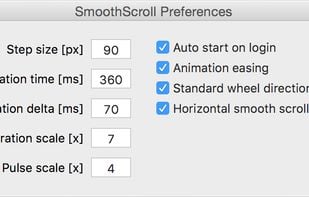
• Save your eyes with fluid, natural scroll animation • Save your fingers from RSI (repetitive strain injury) with scroll acceleration • Save your friends and family by yelling less at your computer • Per application settings (set custom scroll speed or even disable if you need) • Easy to use with great default settings, but also customizable animation
SmoothScroll Videos
SmoothScroll information
Licensing
Proprietary and Commercial product.Pricing
Subscription that costs $1 per month.Alternatives
15 alternatives listedSupported Languages
- English


Comments and Reviews
I've recently started using smooth control and it's absolutely changed the way I use my MacBook it makes the entire experience of using my Macbookair M1 and my mouse so much more enjoyable and effortless my mouse just glides so smoothly
SmoothScroll is listed as Freemium, but it's actually a 21-day trial, followed by an annual fee of €25.10. This should be classified as a Trial, not Freemium, which usually means a permanently free version is available.
I was in need of an app to smoothen out my bluetooth mouse scrolling on my MacBook. SmoothScroll suits my needs perfectly. I wasn't previously aware of the availability of a software like this - but I'm chuffed to have found it. The impact it has had on my computer usage has been really positive. Thanks for developing such a truly useful app.
As a software dev, I find SmoothScroll very effective and easy to use. It fixed my jumpy/flickering mouse wheel scrolling issues and makes long code navigation in IDEs like Visual Studio smoother and more precise. I like the minimalistic UI and useful pre-optimized preference options.
I like smooth scroll because of how easy it is to use and how user friendly it is. The setup is really easy and it works really good. It gives the user a very premium scrolling experience and makes it feel much better. Would definitely reccomend this app!
This app is the only way to properly configure your mouse scroll wheel movement, accuracy, and precision in windows. The app is very well designed, with a simple to use user interface. Pros: • Well-designed interface • Many customization options • Great customer support • Great price • Works for all apps and can be configured to exclude certain applications Cons: • I did not like the default settings, and it took me a few tries before I found a setting that I prefer. (however my mouse is a trackball mouse with a touch sensitive scroll wheel, so your experience may differ) • There is no Linux version • There are no default presets to choose from I would recommend this application for anyone that wants to have a smoother scrolling experience
Have tried other apps for enable smooth scrolling but this worked in every app that I use in my Mac (specially in Zen, a Firefox based browser where no other app worked well on). It's simple, the options are enough for a good experience and liked the way this improves the system feeling.