SlowBird is desktop software for learning music by ear, for Mac (macOS 14 or later) and Windows (Windows 10 or later). It’s built by musicians for musicians. People use it to transcribe solos on any instrument, and jazz above all.
Slow it down without changing the pitch. Play any recording at 25% to 200% speed while the key stays put, so fast lines stay clear enough to hear note by note. Pitch is a separate control: transpose in semitones or fine-tune in cents, and the tempo never moves.
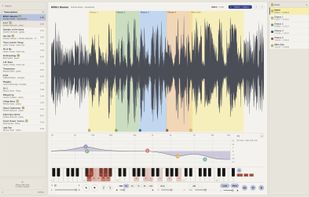
Loop the hard bars. Drag across the waveform to loop a passage. The loop point is click-free, so a phrase repeats as smoothly as you need it to.
Keep everything you learn. Mark a passage, give it a name and a colour, and it stays pinned to the recording as a loopable note. Your library holds every solo you’re studying, searchable by tune, soloist and instrument. A lick you saved months ago is one click from playing on a loop.
See every lick in one place. The notes viewer lays out every saved note in your library as a card on one canvas, arranged by tag, soloist, track, name or colour. Search matches note names, tags, tracks and soloists, so typing “Parker” lights up every Charlie Parker phrase you’ve saved. Click a card and it plays.
Record what your computer is playing. Capture a lesson, a backing track or a video clip straight into your library with one click (Cmd-R or Ctrl-R). It uses the audio capture built into macOS and Windows, so there’s no BlackHole, Audacity or driver to install, and it never records your microphone.
Practise along to video. Open an MP4 or MOV, or paste a link, and the picture plays over the waveform in time, at any speed and round the loop.
Hear the hard parts. A pitch heat map shows which pitches are sounding in any selection, on a reference keyboard. That helps you work out a hard note, a bass line or a voicing by ear. A five-band EQ lifts a buried bass line or cuts the mud from an old transfer. Channel isolation picks out one side of an old two-track recording.
Works with: MP3, M4A, AAC, WAV, AIFF, FLAC and CAF audio, plus MP4 and MOV video. It has numbered markers and full keyboard control.
Private and local. No account and no telemetry. Your audio and your library never leave your computer. The app goes online only to check for updates and its licence.
Price: free 7-day trial, no card needed. After that it’s £19.99 / $25, one-time, with no subscription. One licence covers two computers, Mac or Windows in any mix, and updates are free.






 Hugh-Vincent added SlowBird as alternative to Amazing Slow Downer, Transcribe!, Loopero, PracticeSession and 9 more

 Unseen Forms LTD


No comments or reviews, maybe you want to be first?