
Sleep Timer: Menu Bar & Widget icon

Sleep Timer: Menu Bar & Widget

Menu bar sleep timer for the Mac. Sleep or dim the screen after a countdown, at an exact time, or on a daily bedtime schedule. Paid once, no subscription.
Sleep Timer: Menu Bar & Widget screenshot 1

Cost / License

  • Pay once
  • Proprietary

Platforms

  • Mac  macOS 14.0 or later, Apple Silicon and Intel
0likes
0articles
Save

Features

Features

Highlights All activities

Sleep Timer: Menu Bar & Widget News & Activities

Recent activities

Sleep Timer: Menu Bar & Widget information

AlternativeTo Categories

OS & Utilities, Office & Productivity

Popular alternatives

View all
Sleep Timer: Menu Bar & Widget was added to AlternativeTo by teroxai on and this page was last updated .

No comments or reviews, maybe you want to be first?

Official Links

What is Sleep Timer: Menu Bar & Widget?

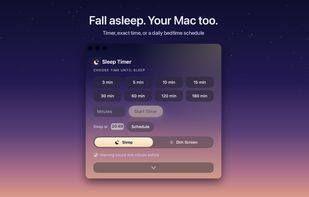
Sleep Timer puts your Mac to sleep, or just dims the screen, after a countdown, at an exact time, or on a bedtime schedule with its own time for each day. It lives in the menu bar with a live countdown.

Start it in one click with a preset from 3 minutes to 3 hours, type any duration, or set an exact time like 23:30. A minute before sleep you get a gentle warning with three choices: extend, sleep now or cancel.

The bedtime schedule is the one Apple removed from macOS. Pick the nights and give each its own time: 11 on weeknights, 1 AM on Fridays, weekends left alone.

You can sleep the whole Mac, or use Dim Screen: the display fades to black and the audio keeps playing. Move the mouse and the screen is back. In the last minutes the system volume fades down, and Apple Music can be paused right before sleep.

It is also on the desktop as a widget with quick actions (start, +15 min, stop), in Control Center on macOS 26 and later, and in Siri, Shortcuts and Spotlight.

Native SwiftUI app, 1.6 MB, 10 languages, launches at login. No tracking and no network access. $2.99 once, no subscription.

