




Sill for File Explorer
1 like
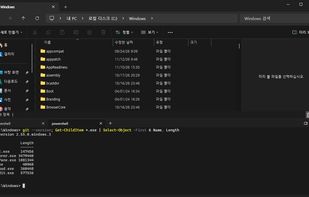
Sill adds an integrated terminal panel to the bottom of Windows File Explorer, like the terminal panel in KDE Dolphin. It extends File Explorer itself instead of replacing it.



Features
Highlights All activities
Sill for File Explorer News & Activities
Recent activities
- 2j2h5 updated Sill for File Explorer
- 2j2h5 added Sill for File Explorer
- 2j2h5 liked Sill for File Explorer
 2j2h5 added Sill for File Explorer as alternative to File Explorer and Dolphin File Manager
Developed by
 jiho.lee
Licensing
Open Source (MIT) and Free product.Written in
Alternatives
2 alternatives listedBadge
Get an embeddable badge for Sill for File ExplorerSupported Languages

AlternativeTo Category
OS & UtilitiesGitHub repository
- 3 Stars
- 1 Fork
- 0 Open Issues
- Updated

No comments or reviews, maybe you want to be first?