ShroomPen is an AI writing assistant that works inside the text boxes you already use. Click into a field and a small row of buttons appears next to it:
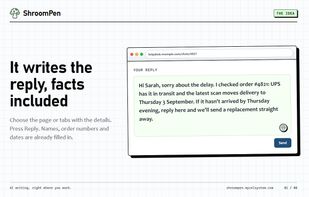
• Reply: answers the message in front of you. Your rough note is the brief.
• Rewrite: makes your draft clearer and more natural, with the same meaning.
• Fix grammar: spelling and punctuation, in the language you wrote.
• Translate: into the language you pick. Select part of the text to translate just that part.
For anything longer, press Ctrl+Q (you can change the shortcut), click the toolbar button, or right-click and choose Open ShroomPen. The writing panel takes a plain instruction, lets you edit the result, and then copies it or inserts it into the page.
Replies with the facts in them
You choose what ShroomPen reads for each request: the field, the text you selected, the current page, other open tabs you pick, or a PDF open in a tab. Names, order numbers and dates come from those sources instead of being guessed. Workspaces keep notes and saved pages you reuse often.
Bring your own key (BYOK)
ShroomPen runs on your own AI provider account:
• OpenRouter: sign in once, no key to copy. One account covers many models.
• OpenAI or Gemini: paste your API key.
• A local model in Ollama or LM Studio: no key, no cost, and requests stay on your computer.
• Any other endpoint that accepts OpenAI-format requests. More direct providers are listed in the settings.
ShroomPen itself is free. There is no ShroomPen account and no subscription. You pay your provider for what you use, or nothing with a local model.
Privacy, in short
• There is no ShroomPen server. Requests go straight from your browser to the provider you set up, over HTTPS. Plain HTTP is allowed only for a model on your own computer.
• Nothing is read until you turn a source on, and a field changes only when you click an action or Insert.
• Password, payment card and one-time-code fields are skipped. You can switch ShroomPen off for any site.
• The extension has no analytics, telemetry or ads. The ShroomPen website counts page views in aggregate; the extension sends it nothing.
• Settings and API keys are stored in your browser profile. ShroomPen does not add its own encryption to them, and each key is sent only to its own provider.
• Before first use, ShroomPen shows what it reads and where it goes, and waits for your OK. Settings > Clear local data removes what it stored.
Privacy policy: https://shroompen.com/privacy
Setup guides and help: https://shroompen.com







 Ivan Balshalapau
No comments or reviews, maybe you want to be first?