





Sheet Image Downloader
Create for repeatable workload of downloading images from URLs while renaming the images in batches at the same time.


Features
- Image Downloader
- Bulk Image Downloader
Sheet Image Downloader News & Activities
Recent activities
- sheetimagedownloader added Sheet Image Downloader
- POX updated Sheet Image Downloader
 sheetimagedownloader added Sheet Image Downloader as alternative to Chrono Download Manager, Internet Download Manager, Download Accelerator Manager and Download Shuttle

Sheet Image Downloader information
Licensing
Proprietary and Free product.Alternatives
6 alternatives listedBadge
Get an embeddable badge for Sheet Image DownloaderSupported Languages
- English


What is Sheet Image Downloader?
Download hundreds or thousands of images directly from spreadsheets in just a few clicks.
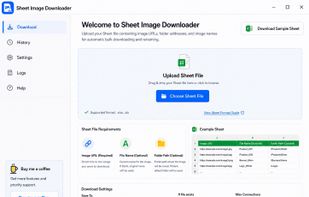
Sheet Image Downloader is a powerful desktop application that helps businesses, eCommerce sellers, marketers, researchers, and data professionals quickly download images from Excel files, CSV files, and spreadsheet exports. Instead of manually opening and saving image links one by one, simply import your spreadsheet, select the column containing image URLs, and let the app download everything automatically.
Whether you're managing product catalogs, supplier data, inventory systems, research datasets, or content libraries, Sheet Image Downloader saves hours of repetitive work and makes large-scale image collection simple and efficient.
Key Features
Bulk Image Downloads
Download hundreds or thousands of images at once from spreadsheet URL lists. Eliminate manual downloading and dramatically speed up your workflow.
Spreadsheet Support
Works with popular formats including:
• Excel (.xlsx, .xls) • CSV files • Google Sheets exports • Other spreadsheet-based data sources
Fast Download Performance
Utilizes multi-threaded downloading to process multiple images simultaneously, helping you complete large jobs faster.
Automatic File Organization
Save images with organized file names and folder structures based on spreadsheet data such as product IDs, SKUs, categories, or custom columns.
Download Monitoring
Track download progress in real time and identify failed or missing image URLs with detailed status reporting.
Privacy First
All processing happens on your computer. Your spreadsheets and image data are never uploaded to external servers, ensuring maximum privacy and control.
Easy to Use
No technical skills required. Import your file, choose the image URL column, select a destination folder, and start downloading.
Perfect For
• eCommerce product image downloads • Supplier catalog management • Marketplace listings • Digital marketing assets • Research and data collection projects • Content management workflows • Website migration projects • Bulk image archiving
How It Works
- Import your spreadsheet.
- Select the image URL column.
- Choose your download folder.
- Start the download process.
- Access all downloaded images instantly.
Benefits
• Save hours of manual work • Download images in bulk • Improve productivity • Organize files automatically • Reduce errors and missing assets • Keep your data private • Handle large image collections with ease
Sheet Image Downloader is the fastest and easiest way to turn spreadsheet image URLs into organized local image files. Whether you're downloading a few hundred images or managing massive catalogs, the app provides a reliable solution for bulk iage downloading from Excel, CSV, and spreadsheet data.