
SendMyVoice icon
SendMyVoice icon

SendMyVoice

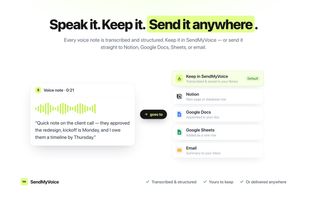
SendMyVoice turns spoken notes into transcribed, structured text and delivers them to Notion, Google Docs, Google Sheets, or email, with shareable listen links for any recording.
SendMyVoice screenshot 1

Cost / License

  • Freemium (Subscription)
  • Proprietary

Platforms

  • Online
  • Software as a Service (SaaS)
1like
0comments
0articles

Features

Properties

  1.  Privacy focused
  2.  Lightweight
  3.  AI-Powered

Features

  1.  No Coding Required
  2.  No Tracking
  3.  Cloud Sync
  4.  End-to-End Encryption
  5.  Ad-free
  6. Notion icon  Notion Integration
  7.  Workflow Automation

SendMyVoice News & Activities

Highlights All activities

Recent activities

SendMyVoice information

  • Developed by

    DE flagOleksii Sribnyi
  • Licensing

    Proprietary and Freemium product.
  • Pricing

    Subscription that costs from $6 per month + free version with limited functionality.
  • Alternatives

    5 alternatives listed
  • Supported Languages

    • English
SendMyVoice was added to AlternativeTo by Oleksii Sribnyi on and this page was last updated .
No comments or reviews, maybe you want to be first?

What is SendMyVoice?

SendMyVoice is a voice-notes app that turns what you say into transcribed, structured text and delivers it to the tools you already use. You record a note, it gets transcribed automatically and saved to your dashboard, and from there you can keep it, share it, or route it somewhere with a workflow. "Coffee with the client, $14.50" becomes an expense row in a Google Sheet. A brain dump becomes a clean Notion page. A post-call summary becomes an email to your team with the decisions and action items pulled out.

The structuring step is what sets it apart from a plain transcriber: instead of a wall of text, SendMyVoice parses fields like amounts, dates, and categories, so a note lands as a real database entry rather than a paragraph you have to clean up. You set up reusable workflows once -one for expenses, one for standups, one for meeting notes - and each recording flows to the right destination automatically.

SendMyVoice transcribes live recordings or uploaded audio files, and handles accents, background noise, and fast speech. Every recording is saved, searchable, and playable from your dashboard, and can be downloaded at any time. Recordings can be delivered to a Notion page or database, Google Docs, Google Sheets, or as a formatted email summary to your team, with reusable workflows keeping each type of note going to its own place. Slack delivery is planned.

Beyond delivery, any recording can be shared as a public link that anyone can play in the browser with no account needed. Shared links from the free tool support an expiry time, optional password protection, and a QR code. You can paste a waveform pill directly into a Gmail or Outlook email that links back to the player, or embed a customizable audio player on a website with light/dark themes and a custom accent color.

Official Links

