
Scrollout icon
Scrollout icon

Scrollout

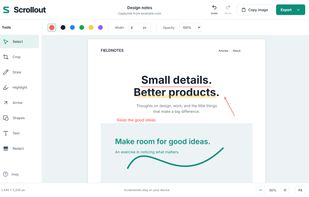
Scrollout is a free Chrome extension from FarFlash Group Ltd. for full-page screenshots and local editing. Capture the page, draw, highlight, add arrows, shapes or text, crop, and cover sensitive areas with opaque black redaction.
Scrollout screenshot 1

Cost / License

  • Free
  • Open Source (MIT)

Application type

Platforms

  • Google Chrome
0likes
0articles
Save

Features

Properties

Features

Highlights All activities

Scrollout News & Activities

Recent activities

Scrollout information

AlternativeTo Category

Photos & Graphics

GitHub repository

  •  0 Stars
  •  0 Forks
  •  5 Open Issues
  •   Updated  
View on GitHub

Popular alternatives

View all
Scrollout was added to AlternativeTo by FarFlash on and this page was last updated .

No comments or reviews, maybe you want to be first?

What is Scrollout?

Scrollout is a free Chrome extension from FarFlash Group Ltd. for full-page screenshots and local editing. Capture the page, draw, highlight, add arrows, shapes or text, crop, and cover sensitive areas with opaque black redaction. Move and resize annotations, undo or redo, and export PNG, JPEG, A4 PDF, or a PNG clipboard copy. Every tool and export is included without a paywall.

Screenshots are processed on your device and never uploaded to FarFlash. There are no accounts, analytics, subscriptions, paid upgrades, or screenshot upload service. The source is MIT licensed.

Captures are temporary: export before closing the last editor. Desktop Chrome 120+ is supported. Capture stops at the initial document dimensions; independently scrolling widgets and embedded frames retain their visible contents. Protected browser pages can block capture. Very large image exports are split into numbered parts in a ZIP.

Version 1.0.2 is available in the Chrome Web Store. A newer 1.0.3 ZIP/source release is also available from the official website.