ScriptCut is a browser-based pre-edit workspace for long, unscripted footage: interviews, documentaries, podcasts, panels, testimonials and talking-head recordings.
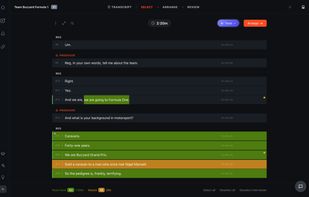
Upload a recording and ScriptCut builds a word-level transcript with the speakers detected. You pick the cut by highlighting text, down to individual words, while a live runtime counter tells you exactly how long your edit is. Clean the transcript first if you want: remove filler words and long pauses, fix spelling, split and merge lines. Then arrange the moments into a story, group them into acts and chapters, and send a share link so your client can review, comment and approve without an account and without touching the edit.
When the story is settled, export it. The timeline (XML) export rebuilds your cut frame-exact in DaVinci Resolve, Adobe Premiere Pro, Avid Media Composer or Final Cut Pro, in order, trimmed, with your groups as markers and your notes as timeline markers. You also get a formatted client PDF, a plain-text editor cut sheet with timecodes, subtitles in SRT or WebVTT to broadcast standards, and a spliced audio file of the selection. DaVinci Resolve and Premiere Pro additionally have their own ScriptCut panel that pairs to your account and relinks the media for you.
The ProAI plan adds an AI suite that proposes a first pass rather than making the decision for you: AI Cleanup, AI Select, AI Arrange, AI Story, AI Clips and AI Translate. ScriptCut Social turns the same recording into vertical short-form clips with shot-by-shot auto reframe, split screen, animated captions, AI cover images, per-platform captions and scheduling to Instagram, TikTok, YouTube, LinkedIn and Facebook.
ScriptCut does not replace your editing software. It decides what the story is; your editor decides how it is presented.




 ScriptCut
