
ScribeHold icon
ScribeHold icon

ScribeHold

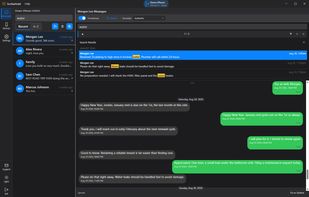
ScribeHold is a Windows application that copies the message history off an iPhone or iPad and makes it searchable on a Windows PC. It reads iMessage, SMS, MMS and RCS conversations, along with their attachments and contacts, and stores them on the same machine.
ScribeHold screenshot 1

Cost / License

  • Freemium (Subscription)
  • Proprietary

Application type

Platforms

  • Windows
0likes
0articles
Save

ScribeHold News & Activities

Highlights All activities

Recent activities

ScribeHold information

  • Developed by

    US flagSolimark LLC
  • Licensing

    Proprietary and Freemium product.
  • Pricing

    Subscription ranging between $49 and $149 per year + free version with limited functionality.
  • Alternatives

    12 alternatives listed
  • Badge

    Get an embeddable badge for ScribeHold
  • Supported Languages

    • English

AlternativeTo Categories

Backup & Sync, Social & Communications
ScribeHold was added to AlternativeTo by Solimark on and this page was last updated .

No comments or reviews, maybe you want to be first?

Official Links

What is ScribeHold?

ScribeHold is a Windows application that copies the message history off an iPhone or iPad and makes it searchable on a Windows PC. It reads iMessage, SMS, MMS and RCS conversations, along with their attachments and contacts, and stores them on the same machine. Nothing is uploaded.

It exists because Windows has no built-in way to read an iPhone's message history. Windows Phone Link mirrors new messages as they arrive; it cannot show conversations from before it was set up.

The free tier searches the entire history, reads the last 90 days, and exports the last 30. ScribeHold Complete ($4.99/month or $49/year, renewing at $39/year) removes those limits. The Legal Export Pack ($149/year, renewing at $119/year, includes Complete) adds a Bates-numbered PDF/A, a separate SHA-256 manifest, an affidavit-of-authenticity cover page, a per-message metadata CSV, and matter binding.

Limitations, stated plainly:

  • Windows only. There is no macOS, iOS, or Linux build.
  • Encrypted iPhone backups are not supported. Turn backup encryption off before the first run.
  • Apple requires the device passcode on the device for every backup on iOS 16.1 and later. That prompt comes from iOS and cannot be skipped.
  • It cannot restore anything to a phone. It reads; it does not write to the device.
  • It cannot send messages, and it does not mirror new messages as they arrive.
  • It does not recover messages iOS has already purged, and it is not a forensic examination.