


Screenplay Editor
Like
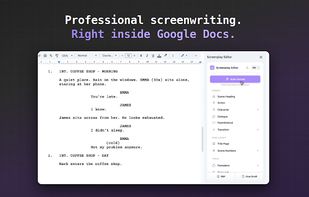
Screenplay Editor turns Google Docs into a screenwriting tool. You type a character name, you press Enter, and you are already in dialogue. You press Tab, and you are in a parenthetical. Scene headings, action, dialogue, parentheticals and transitions format themselves while you...

Cost / License
- Freemium (Subscription)
- Proprietary
Platforms
- Google Docs
- Google Workspace
- Google Chrome
- Chrome OS


Features
Highlights All activities
Screenplay Editor News & Activities
Recent activities
- Chris Lascelles added Screenplay Editor as alternative to SceneWright Studio
 FIRSTVERSE added Screenplay Editor as alternative to FIRSTVERSE
- hugopthomas1 updated Screenplay Editor
 hugopthomas1 added Screenplay Editor as alternative to Fade In
 hugopthomas1 added Screenplay Editor as alternative to Final Draft, Celtx and WriterDuet
- hugopthomas added Screenplay Editor
- Paul updated Screenplay Editor


Developed by
UnknownLicensing
Proprietary and Freemium product.Pricing
Subscription ranging between $6 and $8 per month + free version with limited functionality.Alternatives
6 alternatives listedBadge
Get an embeddable badge for Screenplay EditorSupported Languages

No comments or reviews, maybe you want to be first?