Often you have to explain something to others, but verbally it becomes hard to tell them and here comes the need to have a good quality Screen Recorder for your Phone. Screen Recorder by Netroz is a lightweight screen video recording app that you must have installed on your phone.
If you want to teach something about phone to someone or if you're going to record some video call, this screen recorder app will be the great help to you. Just a single tap will start recording screen or whatever you will do on your phone.
Handing over your phone to someone is always risky. You remain in doubt if that person is viewing your photos or doing something which is not authorized. In such a case, you can use this screen recorder app to view later what that person did when you gave your phone to that person.
Record screen whenever, wherever you are, and share it or save it. No complicated procedure is involved because you have to launch the app and top on the record screen video icon and this recording app will start recording video of your screen.
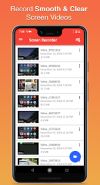
These videos are automatically saved in your media folder, and you can view them from there whenever you want. Screen Recorder by Netroz also has a built-in video organizer. You can view the record screen video in that organizer. Delete or rename any video for your convenience.
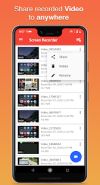
This screen recorder also allows you to share the recorded videos with anyone you want. Tap on the share button, and you will have all the sharing options offered by your Android OS.
To enjoy all these fantastic screen captures and recording app features, you will have to download and install this app now.








 Dmitry Myakishev added Screen Recorder as alternative to Record Meetings

No comments or reviews, maybe you want to be first?