Scinta icon
Scinta icon

Scinta

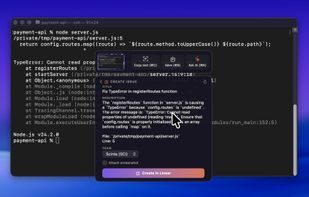
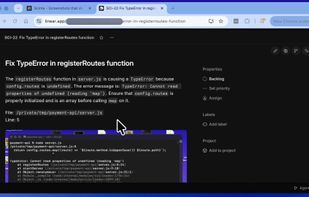
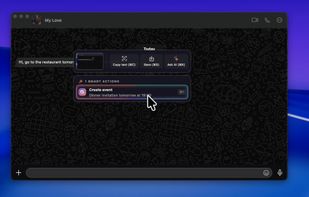
Scinta is a macOS screenshot app with AI smart actions: turn any screenshot into a contact, calendar event, Linear issue, or answer - in two clicks.
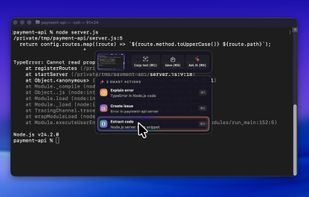
Scinta screenshot 1

Cost / License

  • Freemium (Subscription)
  • Proprietary

Platforms

  • Mac
Scinta screenshot 1
Scinta screenshot 2
+5
Scinta screenshot 3
0likes
0alternatives
0articles

Features

Properties

  1.  AI-Powered

Features

  1.  Ad-free
  2.  No registration required
  3.  Dark Mode
  4.  Custom Actions

Scinta News & Activities

Highlights All activities

Recent activities

  • POX added Scinta

Scinta information

  • Developed by

    UA flagAnton Holub
  • Licensing

    Proprietary and Freemium product.
  • Pricing

    Subscription ranging between $7 and $8 per month + free version with limited functionality.
  • Alternatives

    0 alternatives listed
  • Badge

    Get an embeddable badge for Scinta
  • Supported Languages

    • English

AlternativeTo Categories

Photos & GraphicsAI Tools & Services
Scinta was added to AlternativeTo by Paul on and this page was last updated .
No comments or reviews, maybe you want to be first?

What is Scinta?

Screenshots that do things. Scinta is a macOS screenshot app that understands what you captured - and suggests the action you were about to do anyway.

How it works:

  1. Capture: Hit the hotkey and grab any part of your screen, like you always do.
  2. Scinta looks: It recognizes what's in the shot - an email signature, a meeting time, an error trace, a QR code.
  3. One click: The right actions appear on the capture panel. Click one. Done.

Smart actions

No menus to dig through — Scinta picks the actions most relevant to what you captured.

  • Save contact
  • Create calendar event
  • Create a Linear issue
  • Blur sensitive info
  • Copy text & decode QR
  • Ask AI anything
  • …and more — the catalog grows with every release.

Where your screenshots go

Scinta sees only what you choose to capture - it never records your screen in the background. Only when you run an AI action is that one screenshot sent over an encrypted connection for processing.