RunMacro is a fast, visual, no-code desktop macro recorder, high-speed auto clicker, and browser automation platform for Windows 11 and 10. Automate repetitive desktop tasks, mouse clicks, keystrokes, multi-profile browser workflows, form filling, and data processing without writing a single line of code.
Whether you need a lightweight auto clicker for PC games, an auto keyboard typer for data entry, or a full-scale no-code RPA workflow builder, RunMacro delivers an intuitive visual editor backed by a powerful automation engine.
KEY FEATURES
▸ SMART AUTO CLICKER & RECORDER
Record and replay mouse movements, clicks, and keystrokes with millisecond precision. Uses Microsoft UI Automation to lock onto desktop controls directly—no coordinate drift when windows resize. Includes curved mouse paths, click jitter, and randomized intervals.
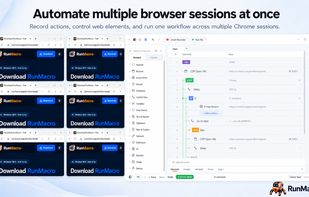
▸ BACKGROUND BROWSER AUTOMATION (CHROME CDP)
Automate multiple Google Chrome sessions in the background without hijacking your physical mouse cursor. Control dynamic web elements via Smart HTML (CSS/XPath), auto-fill forms from Excel/CSV, handle 2FA/OTP flows, and scrape data effortlessly while you keep working.
▸ AUTO KEYBOARD & VISUAL WORKFLOW BUILDER
Automate hotkey combos and human-like typing with clipboard sanitization. Build logic easily using loops, If/Else conditions, dynamic variables, custom delays, and real-time execution logs.
▸ IMAGE RECOGNITION & RUNNER
Features region-based image matching ("If Image Found"), OCR text recognition, and multi-point pixel detection ("If Color Found"). Export protected macro packages (.qmacro) to run via the lightweight RunMacro Runner.
▸ RUNMACRO MANAGER (WEB DASHBOARD)
Optionally manage connected machines, schedule recurring Jobs, and monitor fleet automation in real time via https://manager.runmacro.app (Internet required; included in Trial, Pro, Team).
FREE TIER & TRANSPARENT TRIAL
• 14-Day Free Trial: Full access on first launch to advanced Desktop & Browser automation, Runner, and Manager. No credit card required; never auto-bills.
• Indefinite Free Tier: When trial ends, basic Desktop automation (mouse, keyboard, clipboard, delay, pause) remains 100% free forever. Your macro files are never deleted.
• Optional Paid Licenses: Pro (1 device) and Team (starts at 5 devices) unlock unlimited Chrome CDP, multi-profile runners, and fleet management. Non-recurring licenses.
WHO IS RUNMACRO FOR?
• Digital marketers managing multi-profile browser workflows & form filling
• QA testers building automated desktop and web regression tests
• Accountants & business professionals streamlining daily Excel data entry
• Gamers & power users seeking a modern, safe alternative to legacy clickers
Official Website: https://runmacro.app
Documentation: https://runmacro.app/en/docs/
Support & FAQ: https://runmacro.app/en/faq/







 long-long added RunMacro as alternative to AutoHotkey, AutoIt, UI.Vision RPA, FastKeys and 47 more


No comments or reviews, maybe you want to be first?