ROrganizer is a free, open source window switcher for people who play Dofus on several accounts at once. It gives every running client its own global shortcut, so bringing a character to the front is a single keypress instead of a hunt through Alt+Tab thumbnails that all look alike.
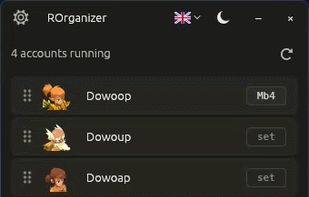
Both client families are supported: Dofus Unity, including the Experimental client, and Dofus Retro. Accounts appear in the list on their own as soon as a client is launched, with the character name and, where the client exposes it, the class. Detection is event driven and takes about 150 to 200 ms, so a client started mid session shows up without a manual refresh.
Each account can be bound to a keyboard key or a mouse button, side buttons included. Two further bindings cycle to the next and previous account, and since the list can be reordered by drag and drop, the cycle follows the player's own party order rather than the order the clients happened to start in. Shortcuts are captured at the system level, so they respond while the game holds focus.
ROrganizer deliberately stays outside the game. It does not read game memory, inject anything, automate actions, or broadcast a keystroke to several clients at once. The only thing it does is change which window is in the foreground. It makes no network connections of any kind, collects no telemetry, and writes no log files: the only file it creates is its own configuration, under %APPDATA%.
It is written in Rust and ships as a single native executable, with no installer and no runtime to add alongside it. Around 8 MB on disk, roughly 75 MB of RAM, and 0% CPU while idle. Windows 10 and 11. Dual licensed under MIT or Apache-2.0.
Releases are built by GitHub Actions rather than on the author's machine, and carry a build provenance attestation, so a downloaded binary can be traced back to the public source code that produced it.
The interface is available in English, French, and Spanish, and the application can sit in the system tray. Builds are published on the GitHub releases page only; the project website presents the software but hosts no files.







 EU
EU
 Loulouw
No comments or reviews, maybe you want to be first?