

Resurrector icon
Resurrector icon

Resurrector

A lightweight process supervisor for Windows interactive sessions that automatically restarts crashed resident apps like PowerToys Awake or AutoHotkey.
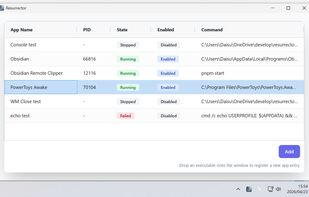
Resurrector screenshot 1

Cost / License

  • Free
  • Open Source (MIT)

Platforms

  • Windows
0likes
0articles

Features

Properties

  1.  Lightweight

Features

  1.  No registration required
  2.  No Tracking
  3.  Works Offline
  4.  Portable
  5.  Ad-free
  6.  Process Monitoring
  7.  Sits in the System Tray
  8.  Application Monitoring

Resurrector News & Activities

Highlights All activities

Recent activities

Resurrector information

AlternativeTo Category

OS & Utilities

GitHub repository

  •  7 Stars
  •  0 Forks
  •  1 Open Issues
  •   Updated  
View on GitHub
Resurrector was added to AlternativeTo by DAISUKE MAKI on and this page was last updated .
No comments or reviews, maybe you want to be first?

Official Links

What is Resurrector?

Resurrector is a lightweight process supervisor specifically designed for Windows interactive desktop sessions. While tools like NSSM or Windows Task Scheduler are excellent for background services, they struggle with managing GUI applications or user-space processes tied to an active desktop session.

Silent crashes of resident applications disrupt your workflow. For example, if PowerToys Awake crashes, your PC might unexpectedly go to sleep. If AutoHotkey or Ditto fails, your custom shortcuts and clipboard history suddenly stop working. Resurrector solves this by continuously monitoring these crucial applications and instantly restarting them the moment they fail.

Key Features:

  • Session-Aware: Seamlessly manages GUI applications and background processes within your active Windows user session.
  • Clean Process Termination: Utilizes Windows Job Objects to ensure entire process trees are terminated cleanly, leaving no zombie child processes behind.
  • Zero Dependencies: Distributed as two lightweight binaries written in Go.
  • Developer Friendly: Configured via a simple TOML file that supports automatic hot-reloading upon changes.
  • Unobtrusive Management: Includes a minimal system tray interface for quick status monitoring and manual process controls.