Replacicon icon
Replacicon icon

Replacicon

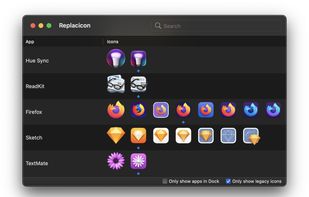
Replacicon makes it easy to find and replace app icons on the Mac. It scans online sources containing thousands of replacement app icons for each of your installed macOS apps.
Replacicon screenshot 1

Cost / License

  • Pay once
  • Proprietary

Platforms

  • Mac
9likes
Save

Features

Properties

Features

Highlights All activities

Replacicon News & Activities

Recent News

Recent activities

No activities found.

Replacicon information

  • Developed by

    Replacicon Project
  • Licensing

    Proprietary and Commercial product.
  • Pricing

    One time purchase (perpetual license) that costs $6.
  • Alternatives

    7 alternatives listed
  • Badge

    Get an embeddable badge for Replacicon
  • Supported Languages

    • English

AlternativeTo Category

OS & Utilities
Replacicon was added to AlternativeTo by Replacicon App on and this page was last updated .

No comments or reviews, maybe you want to be first?

Featured in Lists

Mac apps

List of all Mac apps
By rahulsaigal120 appsUpdated

Official Links

Install from the command line

  • brew install --cask replacicon

Be careful what you paste into a terminal. Check what a command installs before running it.

What is Replacicon?

Just updated to macOS Big Sur? You may have noticed some of the apps in your Dock look a bit inconsistent with the rest of the system.

Replacicon makes it easy to find and replace app icons on the Mac. It scans online sources containing thousands of replacement app icons for each of your installed macOS apps. In just a click, you can change your app icons so they better match the rest of the system, or your own tastes.

To help you quickly find legacy icons to replace on macOS Big Sur, Replacicon relies on machine-learned models to tell which icons are most in need of an update.

Replacicon even watches for app updates in the background so your customized icons are not lost across app updates.