Recipe Clipper keeps the recipes you find online in one clean cookbook, without the ads, pop-ups and long stories that come with them.
Install the browser extension for Chrome, Edge or Firefox, open a recipe page and click the icon. Recipe Clipper reads the recipe from the page and, when the page has no structured recipe data, uses AI to pull out the ingredients, steps, times, servings and nutrition. Review it in the side panel and save it.
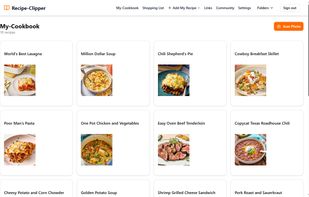
Your cookbook lives at recipe-clipper.com and works on any device:
- Folders and search by ingredient or title
- Scale servings, and convert between metric and imperial
- Cook mode with ingredient checkoff, a step tracker, several timers at once, and a screen that stays awake
- Shopping lists built from your recipes, with similar ingredients combined
- Photo and PDF import: snap up to 4 photos of a handwritten card or cookbook page and AI types it up, originals kept (50 imports a month)
- Import from social posts (TikTok, Instagram, YouTube, Pinterest)
- Meal planning
- Public share links for any recipe
- Household sharing: up to 6 people share one recipe box and one shopping list on one plan
- Works offline once installed as an app
- Export any recipe as a PDF, or your whole cookbook as JSON. No lock-in.
Recipe Clipper also works inside Claude. Add the Recipe Clipper connector and ask things like "What chicken recipes do I have?" or "Add the lasagna ingredients to my shopping list." It can search, save from a link or text, organize folders, manage your shopping list and share recipes.
Switching apps? Import free from Paprika, Plan to Eat, Mela, Crouton, Copy Me That, Recipe Keeper, Cookmate and RecetteTek.
Pricing: one plan with everything, $6.99 USD a month or $49.99 USD a year, cancel anytime. Creating an account is free, and recipes you've saved stay yours to view, search, cook from and export whether or not you keep Premium.
Made by a solo developer in British Columbia, Canada. Questions: support@recipe-clipper.com







 Mikefdev added Recipe Clipper as alternative to Paprika Recipe Manager, Samsung Food, Copy Me That, Mela and 8 more

 Recipe Clipper


No comments or reviews, maybe you want to be first?