
Quicksloth Accessibility Toolbar icon

Quicksloth Accessibility Toolbar

 Like

Free WordPress plugin that adds an accessibility toolbar with 25 tools for text, contrast, fonts and reading, without an account, external requests or cookies.
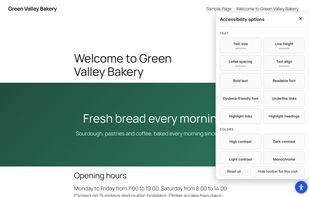
The open panel with the Text, Colors, Reading and Navigation groups.

Cost / License

Since

  • New

Platforms

  • Wordpress
0likes
0articles
Save

Features

Properties

No features, maybe you want to suggest one?

Highlights All activities

Quicksloth Accessibility Toolbar News & Activities

Recent activities

Quicksloth Accessibility Toolbar information

Quicksloth Accessibility Toolbar was added to AlternativeTo by quicksloth on and this page was last updated .

No comments or reviews, maybe you want to be first?

What is Quicksloth Accessibility Toolbar?

Free WordPress plugin that adds an accessibility toolbar with 25 tools for text, contrast, fonts and reading, without an account, external requests or cookies.

A button on every page opens a panel where visitors change text size, line and letter spacing, switch to a readable or dyslexia-friendly font, turn on high, dark or light contrast, use a reading guide or mask, stop animations and show a visible keyboard focus. Their choices are stored only in their own browser.

Everything is served from the site itself: no sign-up, no API key, no tracking and no logo on the pages. The panel works with the keyboard, tells screen readers the name and state of each button, and mirrors itself on right-to-left pages. Labels can be translated on WordPress.org and follow the language of each page once a translation exists.

An accessibility toolbar helps some visitors; it does not make a website conform to WCAG or to the law. Fix your content and code first.