
QuickHMI icon
QuickHMI icon

QuickHMI

Create browser-operated HMI and SCADA interfaces in a graphical Windows editor with SVG controls, faceplates and JavaScript. The runtime runs on Windows, Linux, Docker or Raspberry Pi and connects to industrial PLCs through S7, Modbus, OPC UA and MQTT.
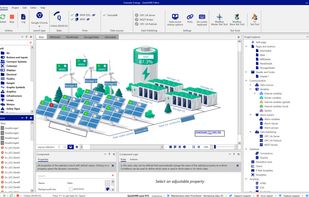
QuickHMI Editor with the included Example_Energy project: wind turbines, PV panels and battery storage built from SVG controls. On the right, the project explorer with data sources, alarm system and the Enterprise data publishing (OPC UA Server, MQTT Broker, OPC UA PubSub).

Cost / License

  • Freemium (Pay once)
  • Proprietary

Platforms

  • Windows
  • Linux
  • Online
  • Android
  • iPhone
  • iPad
  • Self-Hosted
  • Docker
0likes
0comments
0articles

Features

No features, maybe you want to suggest one?

QuickHMI News & Activities

Highlights All activities

Recent activities

QuickHMI information

  • Developed by

    DE flagIndi.An GmbH
  • Licensing

    Proprietary and Freemium product.
  • Pricing

    One time purchase (perpetual license) that costs up to $3390 + free version with limited functionality.
  • Alternatives

    19 alternatives listed
  • Supported Languages

    • English
    • Bulgarian
    • Czech
    • Danish
    • Dutch
    • Estonian
    • Finnish
    • French
    • German
    • Greek
    • Hungarian
    • Indonesian
    • Italian
    • Japanese
    • Korean
    • Latvian
    • Lithuanian
    • Polish
    • Romanian
    • Slovak
    • Slovene
    • Spanish
    • Swedish
    • Turkish
    • Ukrainian
    • Chinese
    • Norwegian Bokmål
    • Portuguese

Apple AppStore

  •   Updated 
  •   0 avg rating
View in AppStore
QuickHMI was added to AlternativeTo by indi-an on and this page was last updated .
No comments or reviews, maybe you want to be first?

Official Links

What is QuickHMI?

QuickHMI is a web-based HMI and SCADA system. You design your visualisation in a graphical Windows editor and run it on Windows, Linux, in a Docker container or on a Raspberry Pi. Operators work in any modern browser, in a dedicated viewer or in the mobile app - no client installation and no client licence.

Licensing works without follow-up costs: QuickHMI licences neither runtimes nor tags. In every commercial edition, data sources, variables, alarms, pages and concurrent sessions are unlimited, and any number of runtime environments is included.

Connectivity covers Siemens S7, Modbus, Beckhoff TwinCAT, OPC UA, MQTT, KNX/EIB, Allen-Bradley, BACnet, SQL databases, InfluxDB and web services. Engineering is drag-and-drop with SVG graphics and around 4,000 ready-made controls, plus faceplates, alarm management, recipes, user management with role-based rights, responsive breakpoints and your own HTML5 and JavaScript where needed.

A free Community Mode is available for private, non-commercial use, limited to 150 variables (details: https://www.indi-an.com/en/quickhmi/community-mode/). Commercial editions are sold to business customers only.

QuickHMI Videos


