PurePDF icon
PurePDF icon

PurePDF

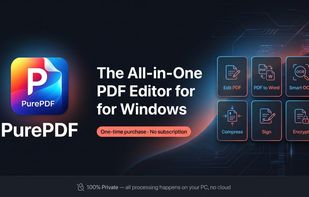
PurePDF is a local PDF toolkit designed for Windows, built with WinUI 3 and .NET 8. It focuses on privacy and speed by ensuring that all document processing, conversions, and edits happen entirely offline on the user's machine.
PurePDF screenshot 1

Cost / License

  • Freemium (Pay once)
  • Proprietary

Platforms

  • Windows  Requires Windows 10 (build 17763) or higher. Built natively with WinUI 3 and .NET 8.
PurePDF screenshot 1
PurePDF screenshot 2
+5
PurePDF screenshot 3
0likes
0comments
0alternatives
0articles

Features

Properties

  1.  Privacy focused
  2.  Lightweight
  3.  Support for Themes

Features

  1.  Full-Text Search
  2.  Works Offline
  3.  Sign PDF files
  4.  Dark Mode
  5.  Built-in viewer
  6.  PDF annotation
  7.  PDF compression
  8.  PDF encryption
  9.  Combine PDF
  10.  Split PDF files
  11.  AES-256 Encryption
  12.  OCR
  13.  Ad-free
  14.  Convert PDF to Word document
  15.  PDF Redaction

PurePDF News & Activities

Highlights All activities

Recent activities

  • DRDMBO added PurePDF
  • POX updated PurePDF

PurePDF information

  • Developed by

    TR flagDrDmbo
  • Licensing

    Proprietary and Freemium product.
  • Pricing

    One time purchase (perpetual license) that costs $10 + free version with limited functionality.
  • Alternatives

    0 alternatives listed
  • Supported Languages

    • English
    • Turkish
    • French
    • German
    • Portuguese
    • Spanish
    • Japanese

AlternativeTo Categories

Office & ProductivitySecurity & Privacy
PurePDF was added to AlternativeTo by DRDMBO on and this page was last updated .
No comments or reviews, maybe you want to be first?

What is PurePDF?

PurePDF is a local PDF toolkit designed for Windows, built with WinUI 3 and .NET 8. It focuses on privacy and speed by ensuring that all document processing, conversions, and edits happen entirely offline on the user's machine. No documents are uploaded to external servers, and the application includes no tracking or data collection.

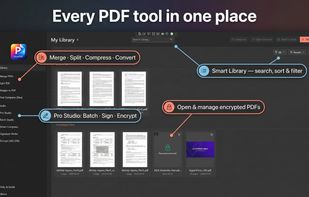
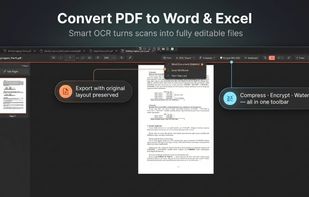
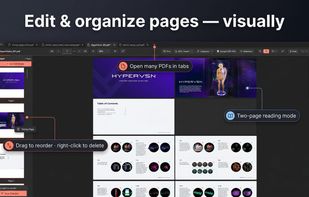
The application features a Smart OCR tool that turns scanned documents into searchable, editable text. Users can also export PDF files into Microsoft Word (.docx) and Excel (.xlsx) formats while preserving the original layout. Standard document management features such as merging, splitting, reordering pages, and converting images to or from PDF are also fully supported.

For data security, PurePDF provides AES-256 encryption alongside a Secure Redaction tool that permanently erases sensitive information (like ID numbers, financial data, or personal details) from the file structure, rather than just masking it visually. A Batch Studio feature allows power users to apply a single operation across multiple files simultaneously to save time.

Additional utility tools include an annotation system for freehand drawing, notes, and custom stamps, a Signature Wallet for reusable signing, and a dedicated library view to keep files organized. The application offers native light and dark themes and integrates into Windows 10 and 11 environments.

Official Links