Precut icon
Precut icon

Precut

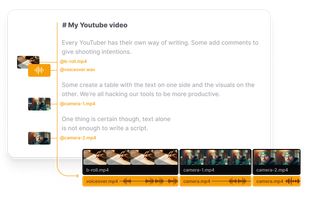
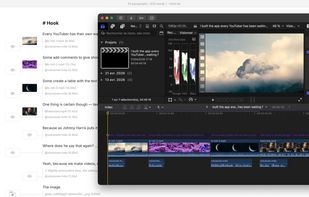
Precut is the all-in-one pre-production tool for video creators. Write your script, link your footage, collaborate with your team and export a ready-to-cut timeline to Final Cut, DaVinci or Premiere.
Precut screenshot 1

Cost / License

  • Subscription
  • Proprietary

Platforms

  • Mac
Precut screenshot 1
0likes
0comments
0alternatives
0articles

Features

  1.  Ad-free
  2.  Timeline-based
  3.  Team Collaboration
  4.  Visual timeline
  5.  Built-in Commenting System
  6.  AI-Powered
  7.  Comment section
  8. Final Cut Pro icon  Final Cut Pro Integration
  9. DaVinci Resolve icon  DaVinci Resolve Integration
  10.  Cut video

Precut News & Activities

Highlights All activities

Recent activities

  • POX added Precut

Precut information

  • Developed by

    FR flagsakod SAS
  • Licensing

    Proprietary and Commercial product.
  • Pricing

    Subscription ranging between $20 and $80 per month.
  • Alternatives

    0 alternatives listed
  • Supported Languages

    • English
Precut was added to AlternativeTo by Paul on and this page was last updated .
No comments or reviews, maybe you want to be first?

What is Precut?

Edit your video as you write. Precut lets you write your script and work with your footage simultaneously, prepare your timeline and export it ready-to-cut in one click.

Your script is done. Now do it again.

Every creator knows the feeling. Hours writing your script on Notion — then hours more rebuilding it shot by shot in your NLE. The exact same story, told twice.

  1. You write your script: Paragraphs, structure, words — everything carefully laid out in Notion, Google Docs, or Obsidian.
  2. Your script becomes unusable: No footage. No timeline. No export. A finished script is just text — the object itself is worthless.
  3. You rebuild it from scratch: Open your NLE. Place clips, voiceovers, b-rolls — in the right order. The same work, a second time.