
PlayRoam icon
PlayRoam icon

PlayRoam

PlayRoam is a Remote Play app for PS5 and PS4. It streams your console to a Windows PC or laptop, or to an Android phone, tablet or Android TV, at 720p or 1080p and 30 or 60 FPS. If the console is in

Editing the on-screen controls: drag, resize or hide any button, or pick the PlayStation, Xbox or Custom layout.
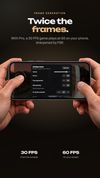
Stream menu with frame generation and FSR upscaling turned on (Pro). A 30 FPS stream plays at 60 FPS.
PS5 Remote Play on an Android phone held sideways, with the PlayStation touch controls over the game.

Cost / License

  • Freemium (Subscription)
  • Proprietary

Platforms

  • Windows  Windows 10 or 11, 64-bit only.
  • Android  Android 8.0 or later. Pro upscaling and frame generation need a Vulkan 1.3 GPU.
  • Android Tablet  Android 8.0 or later. Needs a gamepad.
  • Android TV
0likes
0articles
Save

Features

Features

Highlights All activities

PlayRoam News & Activities

Recent activities

PlayRoam information

  • Developed by

    RS flagPlayRoam
  • Licensing

    Proprietary and Freemium product.
  • Pricing

    Subscription that costs $10 per month + free version with limited functionality.
  • Alternatives

    4 alternatives listed
  • Badge

    Get an embeddable badge for PlayRoam
  • Supported Languages

    • English

AlternativeTo Category

Gaming Software
PlayRoam was added to AlternativeTo by Mike-Okwell on and this page was last updated .

No comments or reviews, maybe you want to be first?

What is PlayRoam?

PlayRoam is a Remote Play app for PS5 and PS4. It streams your console to a Windows PC or laptop, or to an Android phone, tablet or Android TV, at 720p or 1080p and 30 or 60 FPS. If the console is in rest mode, PlayRoam wakes it up for you.
Home network play is free. On Windows you can use a DualSense, DualSense Edge or Xbox controller (USB or Bluetooth), and you get OBS tools and a choice of Fit, Fill or Stretch for the picture. The Android app works with any gamepad the system recognizes, like Xbox, DualSense, DualShock 4, Backbone, Razer Kishi or GameSir controllers, and it has touch controls you can drag around, resize or hide. You can also add a console there by its IP address.

Pro is a subscription, and the same one works in both apps. It adds FSR upscaling, frame generation that turns a 30 FPS stream into 60, and PS5 play away from home over the internet. Windows gets a few extras on top: capture card input for any HDMI console, keyboard and mouse, macros and picture add-ons.

You'll need a free PlayRoam account and a PSN account (PS Plus isn't required), plus an internet connection even when you play at home. The stream tops out at 1080p and 60 FPS without HDR. The app is English only and doesn't support microphones or voice chat.