
Pixture icon
Pixture icon

Pixture

Photobooth software for Windows and Mac with DSLR support, templates, prints, QR sharing and guest payments.
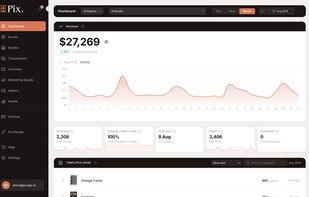
Revenue dashboard: daily sales, sessions, prints and top templates across all your booths.

Cost / License

  • Freemium (Pay once or Subscription)
  • Proprietary

Platforms

  • Windows  64-bit Windows 10 or 11.
  • Mac  Apple Silicon Macs only (M1 or later), macOS 13 or later. Intel Macs are not supported
  • Online  Web dashboard for managing booths, templates and sales. The booth itself runs in the Windows or Mac app
0likes
0articles
Save

Features

  1.  Event management
  2.  Photobooth

Pixture News & Activities

Highlights All activities

Recent activities

Pixture information

  • Developed by

    ID flagPixture
  • Licensing

    Proprietary and Freemium product.
  • Pricing

    One time purchase that costs from $5, and / or subscription ranging between $5 and $300 per year + free version with limited functionality.
  • Alternatives

    2 alternatives listed
  • Badge

    Get an embeddable badge for Pixture
  • Supported Languages

    • English
    • Indonesian
Pixture was added to AlternativeTo by Nadhims on and this page was last updated .

No comments or reviews, maybe you want to be first?

Official Links

What is Pixture?

Pixture turns a Windows or Mac computer and a camera into a professional photo booth.

It works with Canon, Nikon, Sony and Fujifilm cameras, or a webcam. Guests get prints, GIFs, boomerangs and instant QR sharing to their phone. A drag-and-drop template editor lets you design print layouts and every booth screen.

Built for photo booth businesses: guests can pay at the booth (QRIS and card payments), and you can watch every booth live from the web dashboard, including camera, printer, paper and connection status.

Pricing: free plan on one computer (watermarked), Event Pass for 24 hours of the full version, or Pix Pro monthly or yearly.

Pixture Videos

Show 1 more video
