PinSlip
Capture now. Organize later.
PinSlip is a tiny sticky note pinned to your desktop. Jot something down whenever it crosses your mind, pin it to a screen edge, and it quietly keeps you company. Every note is a plain Markdown file living in a folder you choose — fully interoperable with Obsidian. Your words always belong to you.
Meet PinSlip
An everyday sticky note for your desktop No heavy app to launch, no "where should I save this" to think about. Pin a note on screen, write, and it saves itself. Six colors to pick from; when you're done, fold it into a slim title bar and unfold it whenever you need it again.
Want nicer formatting? Try Markdown Plain scribbles are perfectly fine. But when you feel like tidying up — a to-do list, a few headed sections — type in Markdown and watch the layout come alive. Task boxes tick with a click, and screenshots drop straight in with Ctrl+V; you never have to think about where images are stored.
Toss them anywhere, still tidy A crowd of notes never means a mess. Fold the ones you don't need for now; pinned notes dock neatly against screen corners; nearby notes gently snap into alignment like magnets; and they can form a little "squad" — move the whole column together, resize it together, and when you fold one, the notes below slide up to fill the gap.
Your words belong to you All notes live in your own local folder — no cloud in the way. Even if you stop using PinSlip one day, every note stays right where it is: an ordinary Markdown file, readable by Obsidian, VS Code, or any Markdown-friendly editor, ready for you to keep writing.
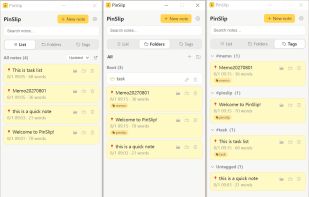
Jotted in a flash, found in a flash Wrote something down days ago? Just search. Tags and folders help the organized among you; full-text search has your back when you only remember the content. Deleted something by accident? The recycle zone keeps it safe until you fish it back out.
More than one computer? Your notes can follow you Point PinSlip at your own git repository (GitHub, GitLab, or CNB) in settings, and your notes sync there on a schedule. New machine? Pull and keep writing. If both sides edited the same note, you can compare the two versions right inside the sticky note and keep the one you like.
Your AI assistant can take notes too PinSlip ships with a built-in MCP server, so your AI assistant can search, read, and write notes for you. It listens on localhost only and is off by default — whether to turn it on is entirely up to you.
See something good on the web? Clip it in one click The Chrome and Firefox extensions are ready: selected text, images, or whole articles (thanks to Readability) become sticky notes with a click, and region screenshots work too. For now they are side-loaded from the source directory; store listings are on the way.







 homerious added PinSlip as alternative to Pinny Notes, Microsoft Sticky Notes, SnappyNotes and Sticky Notes

 homerious


No comments or reviews, maybe you want to be first?