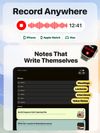
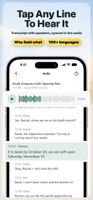
Phrase is an AI note taker for meetings, lectures, and voice notes on iPhone, iPad, Mac, and Apple Watch. Record or import audio, get a transcript in 100+ languages and a clear summary, then edit any part of the note.
At work, meetings become notes with the decisions and to-dos. With Pro, Phrase adds them to Reminders and drafts the recap, and it asks first.
In class, lectures become study notes. With Pro, turn them into flashcards and quizzes.
FOR WORK
• Meeting notes and minutes: a summary, the decisions, and action items with owners and due dates when they're mentioned.
• Record in-person meetings, 1:1s, client meetings, interviews, and research sessions. It's bot-free: nothing joins your meeting.
• With Pro, ask Phrase to add action items to Reminders, put the next meeting on your Calendar, or draft a recap email or message. Phrase asks for your OK first and never sends anything on its own.
• With Pro, ask the assistant across all your notes, like "What did we decide about pricing?" Answers show the notes they came from.
FOR STUDENTS
• Lectures and classes become study notes: key ideas, terms and definitions, examples, and assignments.
• Turn a PDF, lecture slides, or up to 8 photos of the whiteboard into one organized note.
• With Pro, review with flashcards, quizzes, and mind maps made from your own notes.
USE IT FOR
Team meetings, 1:1s, client meetings, interviews, lectures, seminars, study groups, research, brainstorms, sermons and talks, voice memos, and audio or video files you already have.
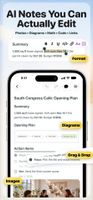
AI NOTES YOU CAN ACTUALLY EDIT
Every note is a document you can edit, not a read-only summary. Retype a line, drag a section, check off to-dos, and add headings, colors, images, code, math, or diagrams. Undo any change. With Pro, ask Phrase to rewrite a section, see exactly what changed, and undo it in one tap.
TURN NOTES INTO SOMETHING NEW
With Pro, ask for a slide deck, a one-page brief, a dashboard, flashcards, a quiz, or a mind map. Present decks on an external display or export them as PDF.
PRIVATE BY DESIGN
No sign-up and no Phrase account. Phrase is local-first: your notes live on your iPhone, iPad, and Mac, and with Pro they sync through your own iCloud. We never store your notes.









 Eversight added Phrase Note as alternative to Otter.ai, Granola, TalkNotes.tech, Coconote and 25 more
 Eversight Studio LLC


No comments or reviews, maybe you want to be first?