
PhotoFroggy icon
PhotoFroggy icon

PhotoFroggy

 Like

See what's filling your iPhone, keep your favourites, and move the rest of your photos and videos to your Windows PC in full quality.
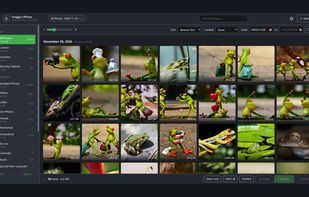
PhotoFroggy screenshot 1

Cost / License

  • Freemium (Pay once)
  • Proprietary

Application type

Since

  • New

Platforms

  • Windows
0likes
0articles
Save

Features

Features

Highlights All activities

PhotoFroggy News & Activities

Recent activities

PhotoFroggy information

  • Developed by

    Holly Tree Group
  • Licensing

    Proprietary and Freemium product.
  • Pricing

    One time purchase (perpetual license) ranging between $10 and $30 + free version with limited functionality.
  • Alternatives

    11 alternatives listed
  • Badge

    Get an embeddable badge for PhotoFroggy
  • Supported Languages

    • English
    • Japanese

AlternativeTo Category

Backup & Sync
PhotoFroggy was added to AlternativeTo by RetroOctopus on and this page was last updated .

No comments or reviews, maybe you want to be first?

What is PhotoFroggy?

PhotoFroggy is a Windows app for iPhone owners whose phone is always full. It shows your iPhone's photo library on your PC the way the Photos app does (your albums, Videos, Live Photos, Screenshots, Selfies and more) with the real size of everything, sorted biggest first. You see exactly what's taking the space, keep your favourites on the phone, and move the rest to your PC.

What it does:

  • Browse your real iPhone library on Windows: albums by name, media types, dates and sizes
  • Export untouched originals, or the edited versions you see in Photos (or both side by side), including Live Photos
  • Export albums as folders, organise by year/month/day, name files by the date taken
  • Optional HEIC to JPG conversion that keeps the date, location and colour
  • Free up space safely: PhotoFroggy only deletes items whose copy it has found on your PC
  • Lock photos you always want to keep: locked items stay on the iPhone even if you select everything
  • Rescue items from Recently Deleted before the iPhone removes them for good
  • Honest about iCloud: it tells you which originals are only in iCloud instead of quietly copying a smaller version
  • Back up only what's new, or automatically when the iPhone is plugged in
  • More than photos: text messages as readable, printable pages plus a spreadsheet, contacts, music and Files-app documents
  • USB cable or your home Wi-Fi (after a one-time USB setup)

Private by design: no account, no cloud upload. Everything goes from your iPhone to your own PC.

Pricing: free for your first 5 GB of photos and videos, plus all your music, documents and contacts, and one text conversation. A one-month pass is $9.99 (never renews), or a lifetime licence $30 with all future updates. No subscription.

English and Japanese. Windows 10 and 11. Digitally signed.