Real PGP encryption, in your pocket.
OpenPGP for iOS and Android. Now you can generate your key on the card itself — born on a YubiKey 5 or Token2 over NFC, the private key never touches the phone — with full hardware-key card management, passphrase-only encryption, and a read-only pass viewer.
Keyring
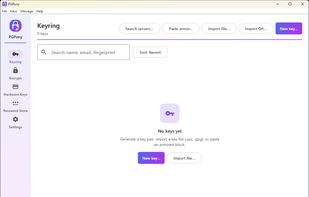
Generate modern OpenPGP v6 (RFC 9580) or classic v4 key pairs — Ed25519 + X25519/Cv25519 — or import existing GnuPG/OpenKeychain keys. RSA and DSA supported for legacy interop.
Hardware Security Keys
Pair an OpenPGP NFC smartcard — YubiKey 5 series or Token2 — and sign, decrypt, and encrypt-and-sign with a key that never leaves the card. Authorized by your PIN and a tap.
On-card Key Generation
New. Generate a fresh Ed25519 + Curve25519 keypair directly on the card over NFC. The private key is born on the token and never touches the phone — the strongest story in mobile PGP.
Card Management
New. Change the admin and user PINs, unblock a locked PIN, and factory-reset a card — all over NFC, right from the app. Full lifecycle control of your OpenPGP smartcard.
Passphrase Encryption
New. Encrypt with just a passphrase — gpg -c style, no keypair required. Perfect for sealing a file for yourself or sharing a secret over a channel you both already trust.
pass Store Viewer
New. Browse and decrypt your existing pass (password-store) entries, hardware-key-backed. Read-only and on-device — a PGP tool that reads pass, by design.
OpenPGP v6 + SEIPDv2
Authenticated encryption (AEAD-OCB) for v6 recipients, with SHA-256 fingerprints and Argon2 passphrase protection. PGPony picks v6 or v4 automatically so older contacts still work.
Encrypt
One or many recipients. SEIPDv2 authenticated encryption for v6 keys, ASCII armor for chat, binary for attachments. Optional signing in the same step — clear-signed or detached.
Decrypt & Verify
Paste armored text or share an .asc / .pgp / .gpg file from any app. Signature verification is automatic.
QR Key Exchange
Turn your public key into a QR code. The other person scans it. No typing, no copy-pasting, no email round-trips.
WKD + Keyservers
Look up any key by email via Web Key Directory — keys served by the recipient's own mail domain. Falls back to keys.openpgp.org.
Share Extension
Encrypt or decrypt from any app — Mail, Files, Messages — without opening PGPony. Tap Share, pick PGPony, done.
Contacts Integration
Match imported PGP keys to your iOS / Android contacts by email. Photos and names auto-populate.
Biometric Lock
Face ID, Touch ID, Optic ID, or fingerprint. Optional second prompt before every decryption.
Expiration Reminders
Local notifications at 30, 7, and 1 day before any key expires — and on the day itself. Never get caught with a dead key.
Auto-clear Clipboard
Configurable countdown clears decrypted text from the clipboard automatically. You can watch the timer if you want.







 TheEmperorArt added PGPony as alternative to GnuPG, GPG4Win, OpenKeychain, AES Crypt and 32 more
 NorseHorse



Comments and Reviews
PGPony is currently the best app for PGP and has the advantage of being cross-platform. Among its main strengths are full implementation of OpenPGP v4 (RFC 4880) and v6 (RFC 9580), plus post-quantum encryption with ML-KEM-768 + X25519 composite keys and Argon2id passphrase protection. It's native on iOS and Android at the same time — something rare among mobile options — and works over any transport channel, without being tied to a specific messenger or email provider. It supports physical security keys over NFC/USB (YubiKey 5, Token2), including on-card key generation. It requires no account and has no ads, analytics, or tracking; the foss build even runs on devices without Google services. The cryptographic core is open source on both platforms under Apache-2.0, and on Android the entire app is public — the same code as the official F-Droid build. It offers full interoperability with GnuPG, lets you bring your own key, and can even serve as an OpenPGP engine for other apps. In daily use, it provides QR code key exchange, WKD email lookup, a share extension, biometric lock, automatic clipboard clearing, key expiration reminders, and support for 6 languages.