WristDocs icon
WristDocs icon

WristDocs

WristDocs is the easiest way to view your PDF, Word (DOCX), Excel, and text files (TXT) directly on your Apple Watch. Whether it's a quick glance at a presentation, a travel itinerary, or important notes on the go — WristDocs keeps everything just a tap away.
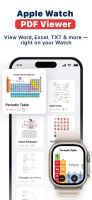
View PDFs, Word, Excel, and TXT files right on your Apple Watch. WristDocs makes your documents easy to access from your wrist.

Cost / License

  • Freemium (Subscription)
  • Proprietary

Platforms

  • iPhone
  • Apple Watch
  • Android
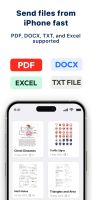
Send files from your iPhone in seconds. PDF, DOCX, XLSX, and TXT files are all supported.
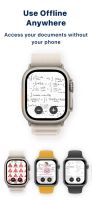
Access your documents offline on Apple Watch. Your files stay available even when your iPhone is not nearby.
+1
Sync documents from iPhone to Apple Watch with ease. Keep your important files ready whenever you need them.
0likes
0comments
0alternatives
0articles

Features

WristDocs News & Activities

Highlights All activities

Recent activities

WristDocs information

  • Developed by

    TR flagONNEX YAZILIM ANONIM SIRKETI
  • Licensing

    Proprietary and Freemium product.
  • Pricing

    Subscription ranging between $5 and $30 per month + free version with limited functionality.
  • Alternatives

    0 alternatives listed
  • Supported Languages

    • English
    • Arabic
    • Bulgarian
    • Catalan; Valencian
    • Chinese
    • Croatian
    • Czech
    • Danish
    • Dutch
    • Finnish
    • French
    • German
    • Greek
    • Hebrew
    • Hindi
    • Hungarian
    • Indonesian
    • Italian
    • Japanese
    • Kazakh
    • Korean
    • Malay
    • Malayalam
    • Polish
    • Portuguese
    • Romanian
    • Russian
    • Slovak
    • Slovene
    • Spanish
    • Swedish
    • Thai
    • Turkish
    • Ukrainian
    • Vietnamese
WristDocs was added to AlternativeTo by Sercan Er on and this page was last updated .
No comments or reviews, maybe you want to be first?

What is WristDocs?

WristDocs is the easiest way to view your PDF, Word (DOCX), Excel, and text files (TXT) directly on your Apple Watch. Whether it's a quick glance at a presentation, a travel itinerary, or important notes on the go — WristDocs keeps everything just a tap away.
With an elegant and intuitive design, you can scroll through pages, zoom in and out, jump to specific pages, and manage your files — all from your wrist.

Perfect For: • Checking study slides or exam notes during class • Viewing boarding passes or hotel reservations hands-free • Reading instructions, schedules, or reminders instantly

Key Features • PDF, Word, Excel & Text File Support Import and view multiple PDFs, DOCX, XLSX, or TXT documents — all directly from your Watch.

• Zoom & Page Navigation Easily zoom in/out and jump between pages with smooth controls designed for small screens.

• Favorites & Collections Organize your documents into folders like "Work", "Lectures", or "Travel", and mark key files as favorites for quick access.

• Seamless iPhone Sync Manage your documents using the iPhone app and sync them to your Watch in seconds.

• Offline Access Access your files on Apple Watch even when your iPhone isn’t nearby.

• File Conversion Tools Convert images and notes into PDF format directly within the iPhone app.

• Photos and Notes Support Need quick access to a photo or a reminder? You can also send images and plain text notes to your Watch when needed.

Official Links