


Pavtube ByteCopy
Pavtube ByteCopy is a pretty efficient of software when it comes to ripping DVDs and Blu-rays to multi-track MKV/MP4/MOV formats.

Cost / License
- Paid
- Proprietary
Application types
Alerts
- Discontinued
Platforms
- Mac
- Windows
The latest version (4.9.3.0) is from May 2019.

Features
- Built-in editor
- Convert DVD to AVI
- Support for subtitles
Pavtube ByteCopy News & Activities
Recent News
Recent activities
 Techie2025 added Pavtube ByteCopy as alternative to Xreveal

Pavtube ByteCopy information
Developed by
 Pavtube Studio
 Licensing
Proprietary and Commercial product.Alternatives
39 alternatives listedSupported Languages
- English


What is Pavtube ByteCopy?
Pavtube ByteCopy is a pretty efficient of software when it comes to ripping DVDs and Blu-rays to multi-track MKV/MP4/MOV formats.
The program has the ability of backing up Blu-ray/DVD collection to multi-track MKV without quality loss, ripping BD/DVD movies to MP4 and MOV with multiple audio streams, and converting BD/DVD from hard discs to virtually any popular video and audio format so that you can freely watch movies on Apple iOS devices, Android OS devices, Windows RT/Pro devices, HDTV, 3D TVs, PSP, PS4, PS3, Plex, WDTV Live, Roku 3 and more devices. In recent update, ByteCopy can support ripping Blu-ray/DVD movie to H.265/HEVC MP4 with better video quality compared to H.264 MP4 in same profile presets. At the meantime, this multi-track Blu-ray/DVD converter can be considered as a user-friendly movie editing tool with the professional functions to trim, crop, merge, insert subtitles, export srt/ass/ssa subtitles, add video effects in the destination movie.
Comments and Reviews
With all the talk of best Blu-ray Ripper Ripper criterion, which one is the best Blu-ray Ripper Ripper after all? Here, Pavtube ByteCopy (Pavtube ByteCopy for Mac) is honored as the best Blu-ray Ripper, best DVD Ripper, best multi-track Blu-ray Ripper, 3D Blu-ray Ripper, 4K Blu-ray Ripper. You may ask why We choose Pavtube ByteCopy as the best Blu-ray ripping software and DVD ripping software. If you read its powerful functions and its highlight, you will know the reasons. NO 1. Losslessly copy Blu-ray/DVD movies Copy Blu-ray/DVD discs to hard drive in MKV container format with multiple audio tracks and subtitles included. NO 2. Rip BD/DVD disc with multi-tracks maintained Backup latest Blu-ray and DVD to MP4/MOV/AVI with multi-track audios for multiple media players and mobile devices. . NO 3. Keep/Create Eye-Feasting 3D Effect Easily create 3D movies from 2D Blu-ray/DVD with abundant 3D effect. Also you can freely rip 3d Blu-ray disc to 3D videos for playback on various 3D players. NO 4. Two Kinds Of Disc Backup Solution Option 1. Full disc copy with original BD/DVD structure with all subs tracks, audio streams and chapter information included Option 2. Copy only BD/DVD main movie to local computer or external hard drive and leave out extras. NO 5. Ecxellent Video Editor Practical video editing features provided for video customizations, including: trim video length, crop video size, adjust video effects, add watermark. Waht's more, you can freely create a single .srt subtitle file with chosen subtitle track from original movie. NO 6. High Runninhg Speed With NVIDIA’s GPU or AMD’s CPU, you can get 30x faster conversion with higher quality. There are too many other perfect features which are waiting for you to explore, Bytecopy won't let you down.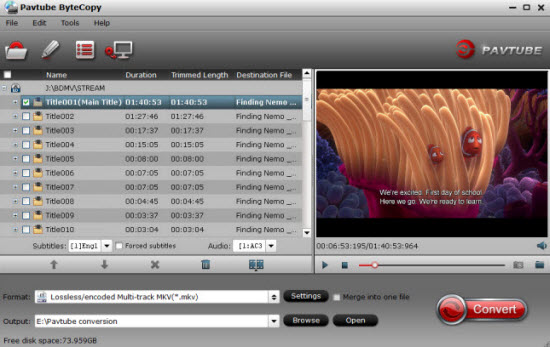
[Edited by Zebra-Running, April 19]