
Parallels Toolbox icon

Parallels Toolbox

 1 like

Parallels Toolbox is a collection of essential tools with zero complicated settings.
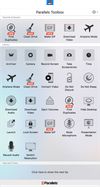
Parallels Toolbox screenshot 1

Cost / License

  • Subscription
  • Proprietary

Application type

Since

  • Since 2018

Platforms

  • Windows
  • Mac
1like
0articles
Save

Features

Features

Highlights All activities

Parallels Toolbox News & Activities

Recent News

No news, maybe you know any news worth sharing?

Share a News Tip

Recent activities

No activities found.

Parallels Toolbox information

Parallels Toolbox was added to AlternativeTo by Danilo Venom on and this page was last updated .

No comments or reviews, maybe you want to be first?

Official Links

Page may contain affiliate links. Affiliate links never affect ranking.

Install from the command line

  • brew install --cask parallels-toolbox

Be careful what you paste into a terminal. Check what a command installs before running it.

What is Parallels Toolbox?

Parallels Toolbox is a collection of essential tools with zero complicated settings. Take a screenshot with a simple click, secure private files with a password, download a favorite video from YouTube or Facebook with no fuss, easily record a screencast, or keep your computer from sleeping with the push of a button.

Tools include:

  • Do Not Sleep
  • Convert a Video
  • Lock Screen
  • Mute Your Microphone
  • Take Video
  • Eject Volumes
  • Hide Desktop
  • Archive Your Files
  • Record Audio
  • Block Camera
  • App Launcher
  • Time Management
  • Download a Video
  • Do Not Disturb
  • Record Your Screen
  • Take Screenshots
  • Take Photo
  • Clean Drive
  • Make GIF
  • Find Duplicates
  • Download Audio
  • Switch Resolution
  • Airplane Mode
  • Presentation Mode

New tools are regularly added—which subscribers get automatically, for no added cost.