
PaneCrew icon
PaneCrew icon

PaneCrew

A free, open-source VS Code extension that grids multiple CLI coding agent sessions (Claude Code, Codex, Gemini CLI) across projects, with a file explorer that follows the focused pane.
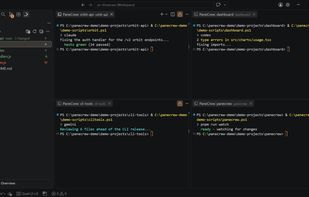
A live grid of terminal panes, each running a different CLI coding agent on a different project.

Cost / License

  • Free
  • Open Source (MIT)

Platforms

  • Visual Studio Code
The file explorer automatically follows whichever terminal pane currently has focus.
Git status is shown across all panes in the grid.
0likes
0comments
0alternatives
0articles

Features

Properties

  1.  Support for Themes

Features

  1.  Dark Mode
  2. Git icon  Git Support
  3.  Terminal-based

 Tags

PaneCrew News & Activities

Highlights All activities

Recent activities

  • Silvio-Lindstedt added PaneCrew
  • POX updated PaneCrew

PaneCrew information

  • Developed by

    Silvio Lindstedt
  • Licensing

    Open Source (MIT) and Free product.
  • Written in

  • Alternatives

    0 alternatives listed
  • Supported Languages

    • English

AlternativeTo Category

Development

GitHub repository

  •  0 Stars
  •  0 Forks
  •  4 Open Issues
  •   Updated  
View on GitHub
PaneCrew was added to AlternativeTo by Silvio Lindstedt on and this page was last updated .
No comments or reviews, maybe you want to be first?

What is PaneCrew?

PaneCrew is a free, open-source VS Code extension for running multiple real, simultaneously visible terminal sessions across different projects at once — a grid of live panes, not a tab-switcher — paired with a single file explorer that automatically follows whichever pane currently has focus.

It is tool-agnostic: it hosts any CLI coding agent equally well, including Claude Code, Codex, Gemini CLI, and plain shells, without encoding assumptions about which agent is running inside a pane.

Core features:

  • A real multi-pane terminal grid inside VS Code, so every parallel agent session stays visible at once instead of being buried behind tabs
  • A file explorer that automatically follows whichever terminal pane currently has focus
  • Git status awareness across the panes in the grid
  • A Needs-Attention queue to jump between panes that require input
  • Works with any CLI tool: Claude Code, Codex, Gemini CLI, or a plain shell

