
OverlayQA icon
OverlayQA icon

OverlayQA

Capture visual bugs, compare Figma designs against live pages, and run AI-powered accessibility audits on any product and page including localhost & staging.
OverlayQA Logo

Cost / License

  • Freemium (Subscription)
  • Proprietary

Platforms

  • Online
1like
0comments
0articles

Features

OverlayQA News & Activities

Highlights All activities

Recent activities

OverlayQA information

  • Developed by

    US flagOverlayQA
  • Licensing

    Proprietary and Freemium product.
  • Pricing

    Subscription ranging between $39 and $249 per month + free version with limited functionality.
  • Alternatives

    10 alternatives listed
  • Supported Languages

    • English

AlternativeTo Category

Development

Popular alternatives

View all
OverlayQA was added to AlternativeTo by emoqa on and this page was last updated .
No comments or reviews, maybe you want to be first?

What is OverlayQA?

OverlayQA is a design QA platform for product teams. It lives in a Chrome extension sidebar and helps designers, developers, and QA engineers catch visual bugs, design drift, and accessibility issues before they ship.

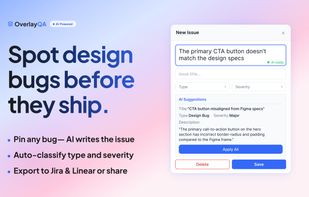
Bug Capture: Click any element on staging, localhost, or production to capture a screenshot with full CSS context, computed styles, selector, viewport, and browser metadata. AI generates structured bug reports with severity and description.

Figma Design Comparison: Overlay Figma frames on any live page. Adjust opacity, scale, and alignment to spot differences. AI visually diffs the design against the implementation and flags mismatches in spacing, color, typography, and layout.

Accessibility Audit: Run full-page WCAG scans combining axe-core automated checks, keyboard navigation testing, and AI-powered visual analysis. Results include a scored summary (0-100), severity breakdown, and a filterable violation list with remediation guidance. Bulk-convert violations into tracked issues.

Export to Jira and Linear: Select issues and push them to your project management tool with screenshots, descriptions, and metadata via OAuth integrations.

Shareable Reports: Generate a public link for any set of issues. Stakeholders without the extension see a read-only page with all issue details and screenshots.

Annotation Mode: Pin numbered markers on live pages to mark up UI issues in context. Each pin captures element properties and opens an inline form for quick issue entry.

OverlayQA is built for designers verifying handoff fidelity, developers catching visual regressions, QA leads running pre-launch reviews, and agencies delivering pixel-perfect client work.

Official Links
