
Overlayed icon
Overlayed icon

Overlayed

 1 like

See who's speaking in your Discord voice channel with a movable overlay, compatible with almost every game or app.
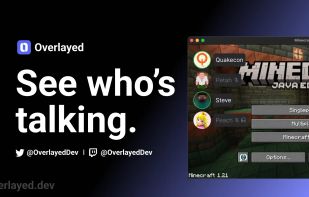
Overlayed screenshot 1

Cost / License

Since

  • Since 2024

Updated

  • Updated Oct 2026

Releases

  • No releases last yearNone last year

Platforms

  • Linux
  • Windows
  • Mac
  • Flathub
  • Flatpak
1like
0articles
Save

Features

Features

 Tags

Highlights All activities

Overlayed News & Activities

Recent activities

No activities found.

Overlayed information

GitHub repository

  •  691 Stars
  •  43 Forks
  •  24 Open Issues
  •   Updated  
View on GitHub

Popular alternatives

View all
Overlayed was added to AlternativeTo by Paul on and this page was last updated .

No comments or reviews, maybe you want to be first?

Official Links

Install from the command line

  • winget install -e --id OverlayedDev.Overlayed
  • brew install --cask overlayed
  • flatpak install flathub dev.overlayed.Overlayed

Be careful what you paste into a terminal. Check what a command installs before running it.

What is Overlayed?

See who's speaking in your Discord voice channel with a movable overlay, compatible with almost every game or app.

  • User List - See who is speaking, muted, and deafened in the current voice channel
  • Pinnable - Always stays on top so you can continue working or gaming
  • Transparent - Transparent window that can ignore mouse clicks
  • Join History - See who enters and leaves a channel