
OrangeDeck icon
OrangeDeck icon

OrangeDeck

 1 like

Bitcoin mempool visualizer for Linux, Windows and Android, with a block height clock, a Bitaxe monitor, a block explorer and market data.
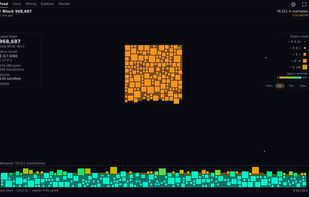
Mempool feed: every waiting transaction is a tile, the last block beside it.

Cost / License

  • Free
  • Open Source (MIT)

Application type

Since

  • New

Releases

  • 11 releases last year11 last year

GitHub

  • GitHub stars: 2

Platforms

  • Windows  Unsigned build, Windows SmartScreen asks once before the first start.
  • Linux  Flatpak bundle from the GitHub releases, plus a plugin for DankMaterialShell.
  • Android  Via the project's own F-Droid repository (add fdroid.orangedeck.dev/repo in F-Droid) or as APK from the GitHub releases.
  • Android Tablet
  • F-Droid
1like
0articles
Save

Features

Highlights All activities

OrangeDeck News & Activities

Recent activities

OrangeDeck information

AlternativeTo Category

Bitcoin & Cryptocurrency

GitHub repository

  •  2 Stars
  •  0 Forks
  •  0 Open Issues
  •   Updated  
View on GitHub
OrangeDeck was added to AlternativeTo by Satoshoe on and this page was last updated .

No comments or reviews, maybe you want to be first?

What is OrangeDeck?

OrangeDeck shows the Bitcoin mempool as a live mosaic. Every waiting transaction is a tile, coloured by age, fee or type, with the last block beside it. The tile view is ported from bitfeed by mononaut.

Four more views sit next to it. The clock shows block height, fees, price, hashrate and the halving countdown in large type, meant for a tablet on the wall. The mining view reads a Bitaxe or another home miner over its local API (AxeOS or cgminer) and shows hashrate, best share, temperature and power. There is also a small block explorer and a market view with candles, volume and liquidations.

Block and mempool data come from mempool.space or from any other mempool instance, your own node included. Prices come from the public streams of Binance, Bybit and OKX. There is no account and no server of its own in between, and it sends no usage data. It only displays, it cannot sign anything.

It runs as a Flatpak on Linux, as a plugin for DankMaterialShell, on Windows and on Android via F-Droid, also as a desktop or home screen widget. MIT licensed.