OptiScaler Client is a modern, high-performance desktop utility designed to simplify the installation, management, and update of the OptiScaler mod across your entire game library. Built with C# and Avalonia UI.
?? Disclaimer: This is not an official OptiScaler project. I am not affiliated with the OptiScaler team. This is a personal project developed without any commercial purpose. Anyone is free to try and use this software at their own risk.
🚀 Key Features
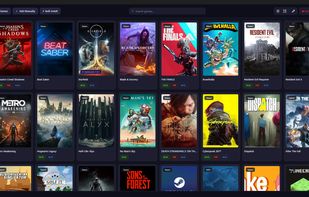
Game Discovery
Multi-Platform Auto-Scanner — Scans Steam, Epic Games, GOG, EA, Ubisoft, Battle.net, Heroic, and Xbox/Microsoft Store libraries in parallel. On Linux, only Steam and Heroic (Epic Games, GOG) are scanned automatically.
Custom Folder Scanning — Add any folder as a scan source for DRM-free or standalone games.
Manual Game Addition — Add games by selecting the executable directly.
Drive Root Filtering — Limit scanning to specific drives.
Smart Exclusions — Pre-configured exclusions for non-game entries (e.g., Wallpaper Engine, Steamworks Redistributables).
Cover Art Fetching — Automatically fetches game cover art from Steam API and SteamGridDB with local caching.
Installation & Uninstallation
Quick Install / Uninstall — One-click toggle per game directly from the main view. Automatically downloads components if not cached.
Auto Install — Detects game directory structure automatically, including UE5/Phoenix game layouts.
Manual Install — Select the target executable manually for non-standard game structures.
Bulk Install — Install OptiScaler across multiple games at once with platform filtering, component selection, and profile application.
Injection Method Selection — Choose the DLL injection method: dxgi.dll, winmm.dll, d3d12.dll, dbghelp.dll, version.dll, wininet.dll, winhttp.dll.
Backup & Restore — Original game files are backed up before installation and restored on uninstall.
Component Management
OptiScaler — Core upscaling mod with stable and beta version channels.
Fakenvapi — Compatibility layer for AMD/Intel GPUs, installed alongside OptiScaler when needed.
Nukem's DLSSG-to-FSR3 — Frame generation bridge that converts DLSS Frame Gen to FSR3.
FSR 4 INT8 Extras — INT8 shader injection for non-RDNA 4 GPUs.
OptiPatcher — ASI plugin loader, automatically configured with LoadAsiPlugins=true in OptiScaler.ini.
Profiles
OptiScaler Profiles — Create, edit, clone, and manage INI-based configuration profiles.
Easy Mode Editor — Simple toggle-based interface for common settings.
Advanced Mode Editor — Full section-based settings editor with search and sidebar navigation.
Default Profile — Set a default profile that is applied automatically during Quick Install and Bulk Install.
Built-in Default — "OptiScaler Standard" profile ships out-of-the-box with sensible defaults.







 Darlene Sonalder added OptiScaler Client as alternative to DLSS 5 MANAGER and UPSCALE-IT
 Darlene Sonalder added OptiScaler Client as alternative to Magpie, DLSS Swapper, Lossless Scaling, lsfg-vk and 1 more


No comments or reviews, maybe you want to be first?