OpenDocScan icon
OpenDocScan icon

OpenDocScan

Most scanner apps charge a subscription to remove a watermark or lift a page limit, and many keep your documents on their servers. OpenDocScan does the whole job inside your own browser tab instead, so your scans never leave your device and there is nothing to pay for.
OpenDocScan screenshot 1

Cost / License

  • Free
  • Open Source (MIT)

Platforms

  • Online
OpenDocScan screenshot 1
OpenDocScan screenshot 2
+1
OpenDocScan screenshot 3
Alternatives
0likes
0alternatives
0articles
Save

Features

Features

Highlights All activities

OpenDocScan News & Activities

Recent activities

OpenDocScan information

  • Developed by

    OpenDocScan
  • Licensing

    Open Source (MIT) and Free product.
  • Alternatives

    0 alternatives listed
  • Badge

    Get an embeddable badge for OpenDocScan
  • Supported Languages

    • English
    • Chinese
    • Japanese
    • Korean
    • German
    • Spanish
    • Portuguese

AlternativeTo Category

Office & Productivity
OpenDocScan was added to AlternativeTo by opendocscan on and this page was last updated .

No comments or reviews, maybe you want to be first?

Official Links

What is OpenDocScan?

Most scanner apps charge a subscription to remove a watermark or lift a page limit, and many keep your documents on their servers. OpenDocScan does the whole job inside your own browser tab instead, so your scans never leave your device and there is nothing to pay for.

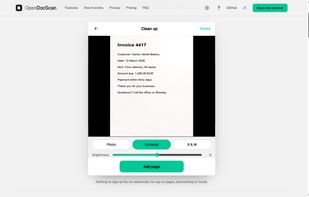
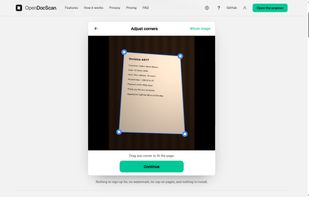
Point your phone at a page, or import a photo you already have. OpenDocScan outlines the sheet, and you can drag any of the four corners if the outline is off. It then straightens the perspective so the page comes back rectangular, and evens out shadows and warm lighting so the paper reads white and the ink reads black. Choose Photo, Enhance or Black & White, and adjust brightness and rotation.

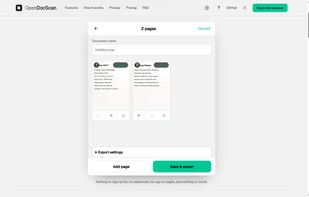
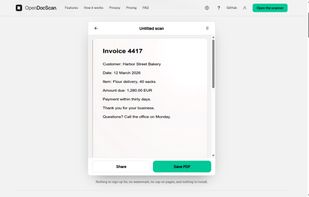
Keep adding pages, reorder or delete them, then export a PDF in A4, US Letter, US Legal or the scan's own shape. Text recognition (English) runs on your device and makes the PDF searchable and selectable.

It is a progressive web app: add it to your home screen and it works offline. OpenDocScan is open source under MIT or Apache-2.0.