





OpenClaw on Windows
Like
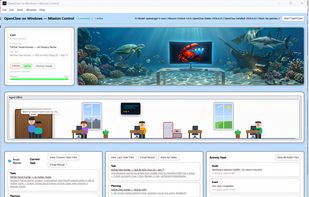
Guided installer that walks you through WSL setup for OpenClaw on Windows, with a premium Mission Control add-on for managing tasks and results.

Cost / License
- Freemium (Pay once)
- Proprietary
Platforms
- Windows
- Self-Hosted


Features
OpenClaw on Windows News & Activities
Highlights All activities
Recent activities
 Xinru Tang added OpenClaw on Windows as alternative to OpenClaw Easy
 Mauricio B. Holguin added OpenClaw on Windows as alternative to AutoClaw, OpenClaw, PaioClaw, LobsterLand and 3 more
- AgentCarl added OpenClaw on Windows
 AgentCarl added OpenClaw on Windows as alternative to NemoClaw


OpenClaw on Windows information
Developed by
 Zero Labs LLC
 Licensing
Proprietary and Freemium product.Pricing
One time purchase (perpetual license) that costs $20 + free version with limited functionality.Alternatives
9 alternatives listedBadge
Get an embeddable badge for OpenClaw on WindowsSupported Languages

No comments or reviews, maybe you want to be first?