





OpenAlive
2 likes
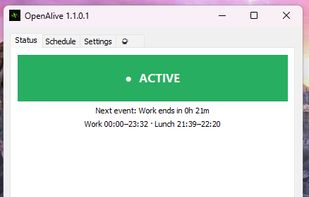
Keeps your Windows PC active with scheduled mouse & keystroke simulation — respects work hours and lunch breaks, zero telemetry.

Cost / License
- Free
- Open Source (GPL-3.0)
Application type
Platforms
- Windows


Features
OpenAlive News & Activities
Highlights All activities
Recent activities
 Opn Build added OpenAlive as alternative to Auto Mouse Mover
 Opn Build added OpenAlive as alternative to StayActive
 Opn Build added OpenAlive as alternative to Mouse Jiggler - Stay Active
- niksavc liked OpenAlive
- Opn Build updated OpenAlive
- capuz liked OpenAlive
- Opn Build updated OpenAlive
 Opn Build added OpenAlive as alternative to Jiggler Mouse
- Opn Build updated OpenAlive


OpenAlive information
Developed by
opn-buildLicensing
Open Source (GPL-3.0) and Free product.Written in
Alternatives
5 alternatives listedBadge
Get an embeddable badge for OpenAliveSupported Languages

AlternativeTo Category
OS & UtilitiesGitHub repository
- 2 Stars
- 0 Forks
- 0 Open Issues
- Updated

No comments or reviews, maybe you want to be first?