Open Desktop Authenticator icon

Open Desktop Authenticator

A maintained, open-source alternative to Steam Desktop Authenticator (SDA) for Windows and Linux, with Steam Guard codes, confirmations and maFile imports.

Manage multiple Steam accounts, view current Steam Guard codes, and open the account browser.

Cost / License

  • Free
  • Open Source (MIT)

Platforms

  • Windows
  • Linux
Review pending trade and Community Market confirmations before approving or denying them.
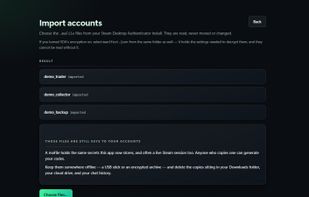
Import existing Steam Desktop Authenticator maFiles without moving or modifying them.
Alternatives
1like
0alternatives
0articles
Save

Features

Properties

  1.  Privacy focused

Features

  1.  No registration required
  2.  Dark Mode
  3.  Two-factor Authentication
  4.  Ad-free
  5.  No Tracking

Open Desktop Authenticator News & Activities

Highlights All activities

Recent activities

Open Desktop Authenticator information

AlternativeTo Category

Security & Privacy

GitHub repository

  •  3 Stars
  •  1 Forks
  •  13 Open Issues
  •   Updated  
View on GitHub
Open Desktop Authenticator was added to AlternativeTo by The-Master on and this page was last updated .

No comments or reviews, maybe you want to be first?

Official Links

What is Open Desktop Authenticator?

Open Desktop Authenticator (ODA) is a free, maintained and open-source alternative to Steam Desktop Authenticator (SDA) for Windows and Linux.

It generates Steam Guard login codes, manages multiple Steam accounts, supports trade and Community Market confirmations, and imports existing Steam Desktop Authenticator maFiles without moving or modifying the original files.

Account secrets are stored locally in a passphrase-protected encrypted vault. ODA requires no ODA account and has no cloud sync, advertising, paid tiers or telemetry. Optional notifications can alert users when confirmations are waiting, while automatic confirmations are disabled by default and restricted to trades and market listings.

The project is MIT-licensed. Its source code, release checksums and build provenance are published on GitHub. Windows users can install ODA through the Microsoft Store, while official Windows and Linux packages are also published through GitHub Releases.

Starting with version 1.5.1, the official Windows installers and portable executable on GitHub are digitally signed and timestamped, with MASTERPANEL LLC shown as the verified publisher. Code signing identifies the publisher and helps verify file integrity; it does not guarantee the absence of Windows SmartScreen warnings.

Open Desktop Authenticator is an independent project and is not affiliated with or endorsed by Valve.