


N
Now Playing Taskbar Widget
1 like
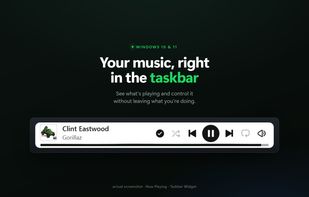
Shows the currently playing track and media controls right inside the Windows taskbar. Works with any player via the Windows media session (Spotify, YouTube, Apple Music, and more): play/pause, skip, seekable progress, plus extra Spotify controls. No login. Windows 10 and 11, free.

Cost / License
- Freemium (Pay once)
- Open Source (MIT)
 EU
EUPlatforms
- Windows


Features
Highlights All activities
Now Playing Taskbar Widget News & Activities
Recent activities
- mechanicwb2-hub liked Now Playing Taskbar Widget
- mechanicwb2-hub added Now Playing Taskbar Widget
- mechanicwb2-hub added Now Playing Taskbar Widget as alternative to ModernFlyouts
Developed by
 MechanicWB
 Licensing
Open Source (MIT) and Freemium product.Pricing
One time purchase (perpetual license) that costs up to $3 + free version with limited functionality.Written in
Alternatives
1 alternatives listedBadge
Get an embeddable badge for Now Playing Taskbar WidgetSupported Languages

AlternativeTo Category
Audio & MusicGitHub repository
- 94 Stars
- 13 Forks
- 10 Open Issues
- Updated


No comments or reviews, maybe you want to be first?