--> Most features completely free!
--> Pro unlocks unlimited at less than $1/month
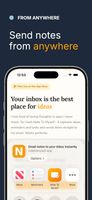
Never lose a great idea again. Note To Myself is the fastest way to capture thoughts, ideas, reminders and tasks - and send them straight to your inbox. No friction. No fuss.
YOUR INBOX IS YOUR SECOND BRAIN
You already live in your email. It is where you actually follow up on things. So why are your ideas dying in note-taking apps you never open?
Note To Myself fits right into your existing workflow. No new system to learn. No extra app to check. Your ideas land where you already work.
THE TWO SYSTEMS YOU ACTUALLY NEED
Most productivity advice tells you to use 10 different apps. The truth is simpler.
You only need two systems:
- A storage system for tasks - whatever you already use
- A funnel for new information - your inbox
Note To Myself completes the funnel. Capture an idea in three seconds. It lands in your inbox. Done.
HOW IT WORKS
Open the app. Pick a note type - Idea, Reminder or Task. Write your note. Hit send. Your idea lands in your email in seconds, ready for when you need it.
FEATURES
- Three note types - Idea, Reminder and Task
- Instant email delivery to yourself
- Voice to text - speak your notes out loud
- Photo attachments - up to 5 photos per note
- Scheduled sending - send notes at a future time
- Share Extension - send from any app on your phone
- Home Screen Widget - quick capture without opening the app
- Audio notes for voice memos
- Secure notes delivered straight to your inbox
- Full sent history and drafts
- Manage tasks easily without switching apps
FREE TO USE
Most features are completely free - voice to text, photo attachments, share extension and home screen widget included. Free users can send up to 5 notes per day, which is plenty for most people.
Need more? Pro unlocks unlimited daily sends and scheduled sending for less than a coffee per month.
SECURE BY DESIGN
Your notes are delivered via SendGrid - the same trusted email infrastructure used by millions of companies worldwide. Notes go straight to your inbox and are never stored or shared.
PERFECT FOR
- Capturing ideas on the go
- Sending yourself reminders
- Voice notes while driving
- Meeting follow-ups
- Shopping lists and tasks
- Quick note taking anytime
- Building your second brain










 EU
EU
 Danilo Venom added alternatives
 JorritBarto added Note To Myself as alternative to Simplenote, Evernote, Notes, Standard Notes and 2 more
 Jorrit Barto


No comments or reviews, maybe you want to be first?