Noise Blocker icon
Noise Blocker icon

Noise Blocker

A microphone utility that uses real-time AI noise cancellation to reduce background noise before it reaches calls, recordings, or voice chat.
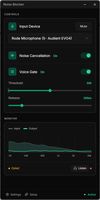
Dashboard — Enable AI noise cancellation and voice gating while monitoring microphone input and filtered output in real time.

Cost / License

  • Pay once
  • Proprietary

Platforms

  • Windows  Works on Windows 10 and 11
4likes
0comments
0articles

Features

Properties

  1.  Privacy focused
  2.  AI-Powered

Features

  1.  Dark Mode
  2.  Ad-free
  3.  No registration required
  4.  Remove Noise
  5.  Noise Reduction
  6.  Push to talk
  7.  Background Noise Reduction

Noise Blocker News & Activities

Highlights All activities

Recent activities

Noise Blocker information

  • Developed by

    NL flagClosed Loop Labs
  • Licensing

    Proprietary and Commercial product.
  • Pricing

    One time purchase (perpetual license) ranging between $25 and $50.
  • Alternatives

    10 alternatives listed
  • Supported Languages

    • English

AlternativeTo Category

OS & Utilities
Noise Blocker was added to AlternativeTo by Cameron Maske on and this page was last updated .
No comments or reviews, maybe you want to be first?

What is Noise Blocker?

Noise Blocker is a focused Windows microphone utility that reduces unwanted background noise in real time. It processes microphone audio locally and provides the cleaned signal to apps such as Zoom, Microsoft Teams, Google Meet, Discord, Slack, OBS, and other software that lets you choose a microphone input.

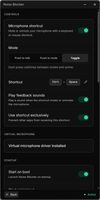
Noise Blocker 3 is a ground-up rebuild that replaces the previous sample-based filtering system with automatic AI noise cancellation. It is designed to reduce sounds such as keyboard and mouse clicks, computer fans, hiss, and room noise without requiring users to record noise samples or manually tune filters. It also includes voice activation, loudness equalisation, and configurable push-to-talk, push-to-mute, and push-to-toggle controls.

The app can be downloaded and tried without creating an account or providing an email address. The free version includes 30 minutes of noise blocking each week. A paid personal licence is a one-time purchase that unlocks unlimited use and includes 12 months of updates and priority support. The installed eligible version continues to work after the update period ends, and renewing updates is optional.

Noise Blocker supports Windows 10 and Windows 11.